| date | desc |
|---|---|
| 09 Dec 2021 | Initial |
The ICON Signals system receives data from devices, raises signals if warranted, and searches the list of rules for a match. If a matching rule expression is found, then that rule program is executed. This usually results in sending notifications and/or activating other devices such as relays.
But what happens when repetitious input data events are received? For example when a user continually presses a panic button or enters an emergency dial code?
We could effectively filter that input by not allowing the matching rule to execute more than once in quick succession. However, events for separate panic button or dial code devices could be received at nearly the same time. In that case, we do want to execute the rule twice.
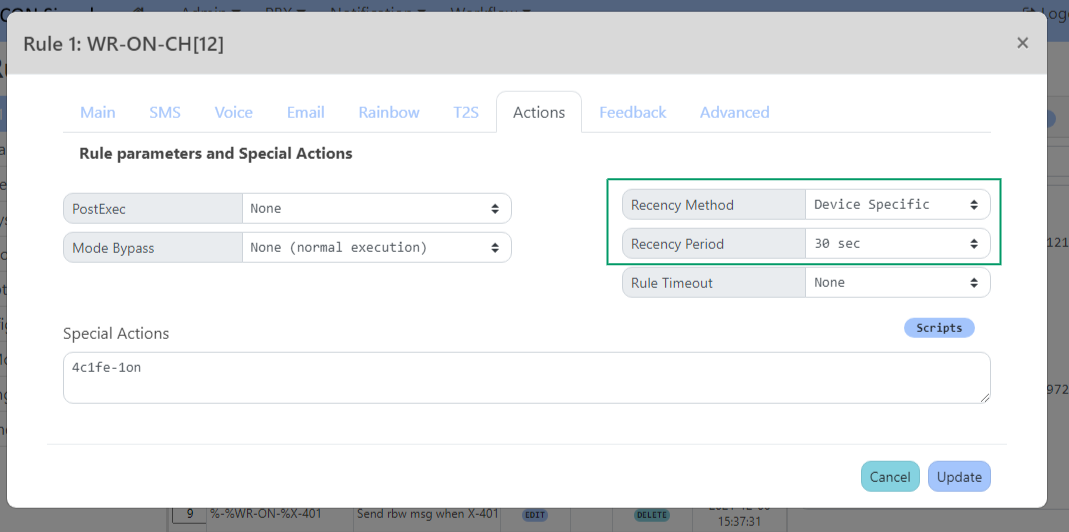
Properties in the Actions tab of the Rule dialog in Workflow > Rule List support various configuration choices related to handling these scenarios.
ICON Signals maintains in-memory information about the last few execution times and matched signal names for each rule. Two rule properties Recency Method and Recency Period are used to determine what happens when there was a "recent" rule execution.
| property | description |
|---|---|
RecencyMethod |
The type of rule execution recency behavior. |
RecencyPeriod |
Minimum interval in seconds between executions of the rule, assuming Recency Method conditions are met. |
RecencyMethod values are:
RecencyPeriod values are: 0s, 5s, 10s, 20s, 30s, 1m, 3m, 10m, etc.
Single-execution recency is the simpler of the method types. If RecencyPeriod is set to a non-zero value and the rule was executed less than RecencyPeriod seconds ago, then the rule is not executed.
It doesn't matter if two or more devices were triggered and raised signals at almost the same time. If those signals match with the same rule, then the rule will only be executed for the first signal.
This method might be appropriate for a site with lockdown pendants where the rule to be executed sends notifications to a large number of people.
The 'Single-Execution Extend' method continues searching the rule list if unable to execute the rule due to recency constraints. The normal 'Single-Execution' method terminates the search immediately.
Device-Specific recency is used in scenarios where alerts from multiple devices could occur and all need to be handled.
For example, consider dial codes received from a nurse call system for different patient beds and matched with a rule that makes a call to the paging system. We want to make the page for every patent, but might not want to make repeated pages for a patient who continually presses their button.
These recency method types check the incoming signal name (which includes the device name) in addition to the recency period interval to determine if rule execution should be avoided.
Similar to the single-execution methods, the 'Device-Specific Extend' method continues searching the rule list if unable to execute the rule due to recency constraints. The normal 'Device-Specific' method terminates the search immediately.
Rule Recency and Preconditions are similar in that both are used to decide if a matched rule should NOT be executed. However, they are different mechanisms.
Rule Preconditions are evaluated before recency checks come into play. The most commonly-used preconditions are redirects and day/time constraints. If a precondition is not met, ICON Signals continues searching the rule list for a matching rule expression
So, for example, a match against a rule with a 'Redirect' precondition will change the signal name to whatever value is given in the precondition and the rule list search will continue. This will happen regardless of any recency property settings for the "redirect rule".
As currently implemented Rule Execution Recency is a mechanism intended for use with rules that were executed no more than a few minutes in the past. As such, it contains no provisions for persistence and contains only a small amount of in-memory data associated with the last few executions for each rule.
This in-memory recency data is cleared by Signals application restarts as well as by changes to the rule list within the Signals UI such as:
There are longer RecencyPeriod property values in the Signals UI (e.g. 4 hrs), but we have not yet considered possible use cases for large values. If one comes to light, we will likely make recent execution data persistent or come up with a different mechanism to handle longer period use cases.
ICON Signals | 2018-2022 ICON Voice Networks