| date | desc |
|---|---|
| 19 Apr 2023 | Initial |
ICON Signals receives events which cause rules to be executed and notifications to be sent to recipients.
In simple cases, notification text is constant. Consider a site with a single contact closure device used as a security button. The message can simply say the recepionist panic button was pressed.
In other cases, we would like to embed data fields relevent to the notification.
For an E911 call or lockdown call, we want to display the calling extension and name associated with that extension if Signals has it.
For a site with multiple lockdown buttons, we might want to provide the location of the button that was pressed.
For a temperature sensor that went out of range, it would be useful to include the temperature value and the limit that was exceeded.
Curly-brace-enclosed keywords within SMS, Email and Rainbow message text enable this functionality. When a rule is executed, Signals checks available state information and replaces those keywords.
ATTENTION! LOCKDOWN IN EFFECT. {ext} {name} {area}
When a lockdown rule with the above notification text is executed, the calling extension number will replace {ext}. If Signals contains a contact record for that extension, the contact name will replace {name} and the contact location will replace {area}.
If there is no location information, {area} is replaced with an empty string. Similarly if there is no contact record, {name} is replaced with an empty string.
The rules for keywords are:
Signals replaces keywords with available state data.
If state data doesn't exist, keywords are replaced with empty strings.
A double-curly-brace syntax allows optional label text if keyword data exists.
A square-bracketed [br] tag inserts a line break.
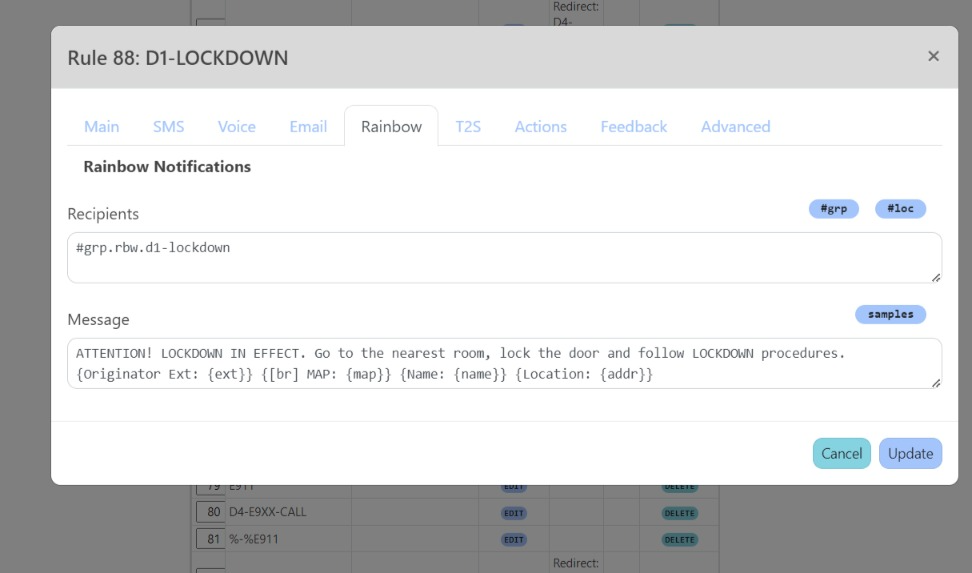
Consider the lockdown rule below.
The first line of the Rainbow message will contain:
ATTENTION! LOCKDOWN IN EFFECT. Go to the nearest room, lock
the door and follow LOCKDOWN procedures.
The originator extension will be appended if we have it. (We wouldn't have an extension if the rule was executed as a result of a contact closure instead of a phone dial code or key press.)
If a contact record is found for the extension, the second line will contain
Here is an example where Signals has all the state information from a fully-populated contact record.

And here's a example of a lockdown rule execution as a result of a contact closure button press.

The contact closure device name was used to populate the keyword {Name: {name}}. However, no information was available for {Originator Ext: {ext}} or {[br] MAP: {map}} or {Location: {addr}} so those double-curly-braced keywords were replaced with empty strings.
The available keywords depend on the type of signal raised.
With the exception of the extension, these table fields are from the Signals contact record. Any or all of them could potentially be blank.
| keyword | source |
|---|---|
{ext} |
CurrentOriginator (extension) |
{name} |
Name from contact record |
{email} |
Email from contact record |
{number} |
Cell number from contact record |
{empID} |
Employee ID |
{addr} |
Street address from Location record tied to contact record |
{location} |
Name from Location record tied to contact record E.g. a city name or building/campus name |
{area} |
Zone or area tied to contact record |
{zone} |
Zone or area tied to contact record |
{map} |
Street address URL from Location record tied to contact record |
| keyword | source |
|---|---|
{signame} |
Name of the signals raised |
{host-node} |
Overwatch node name for this Signals server |
{log-vars} |
Replace with empty string and dump state information in logfile |
{show-vars} |
Insert state info keys and values into the message |
{origin-node} |
Signal Transfer variable |
{datetime} |
Current datetime M/d/yy, h:mm tt |
{datetime3} |
Current datetime d MMM yyyy, HH:mm |
{datetime2} |
Current datetime yy-MM-dd HH:mm |
| keyword | source |
|---|---|
{id} |
Device ID |
{name} |
Device Name |
{status} |
Device state (ON or OFF) |
{value1} |
Data value for I/O Channel 1 |
{units1} |
Unit type for I/O Channel 1 |
{value2} |
Data value for I/O Channel 2 if it exists |
{units2} |
Unit type for I/O Channel 2 |
{value3} |
Data value for I/O Channel 3 if it exists |
{units3} |
Unit type for I/O Channel 3 |
{area} |
Zone or area tied to device entry |
{zone} |
Zone or area tied to device entry |
{addr} |
Street address from Location record tied to device entry |
{map} |
Street address URL from Location record tied to device entry |
| keyword | source |
|---|---|
{id} |
Device ID |
{state} |
Device state (ON or OFF) |
{name} |
Device Name |
{ch} |
I/O Channel number (1 thru N) |
{value} |
Data value for a given I/O Channel |
{units} |
Unit type for a given I/O Channel |
{lowvalue} |
Lower data value limit of I/O Channel |
{highvalue} |
Upper data value limit of I/O Channel |
{url} |
URL associated with camera device |
{ipaddr} |
IP address of device |
| keyword | source |
|---|---|
{missing-node} |
Name of missing node |
{missing-timespan} |
How long node has been missing |
| keyword | source |
|---|---|
{id} |
Device ID |
{state} |
Device state (ON or OFF) |
{name} |
Device Name |
{ipaddr} |
IP address of device |
{userID} |
MATRIX user Id |
{userName} |
MATRIX user name |
{direction} |
entry or exit (IN or OUT) |
| keyword | source |
|---|---|
{feed} |
RSS feed name |
{url} |
RSS feed Url |
{title} |
Title of RSS feed entry |
{summary} |
Summary of RSS feed entry |
{additional} |
Additional RSS feed entry info |
| keyword | source |
|---|---|
{nbr} |
Number of incoming SMS message (E.164 format) |
{ext} |
Extension from contact record of SMS sender |
{name} |
Name from contact record of SMS sender |
{text} |
Body of incoming SMS message |
{media} |
Media link from incoming SMS message |
{media0} |
First media link from incoming SMS message |
{media1} |
Second media link from incoming SMS message |
{media2} |
Third media link from incoming SMS message |
| keyword | source |
|---|---|
{nbr} |
Number of Rainbow sender |
{ext} |
Extension from contact record of Rbw sender |
{name} |
Name from contact record of Rbw sender |
{email} |
Name from contact record of Rbw sender |
{text} |
Body of incoming Rbw message |
| keyword | source |
|---|---|
{text} |
external alert message |
{id} |
Id of external alert sender |
{nbr} |
Number of external alert sender |
{ext} |
Extension from contact record of sender |
{name} |
Name from contact record of sender |
{email} |
Name from contact record of sender |
| keyword | source |
|---|---|
{id} |
PBX Id |
{name} |
PBX name |
{state} |
PBX state |
{text} |
ICON Signals | 2018-2023 ICON Voice Networks