| date | desc |
|---|---|
| 29 Mar 2023 | Initial |
| 21 May 2025 | Modified to use direct TCP connection |
| 12 Sep 2025 | Added database table synchronization |
Two Signals servers can be configured to provide failover functionality.
The servers are configured as "primary" and "secondary" nodes within the Failover configuration screen.
The primary server makes a TCP connection to the secondary server.
Rule execution is disabled in the secondary server by default and only enabled if the primary server has not sent a heartbeat message for a configured amount of time (2-20 minutes).
The secondary server raises a FAILOVER-ON signal immediately after transitioning to the effective primary role.
The secondary server raises a FAILOVER-OFF signal immediately before transitioning from the effective primary role back to its normal secondary role.
This document covers the primary / secondary mechanism as well as the synchronization of database tables between the two servers.
The Primary Signals server opens a TCP connection to the Secondary Server and sends a periodic heartbeat message. Once a connection and heartbeat cadence is established, it is the absence of this heartbeat that causes the secondary server to assume primary server responsibilities.
             TCP
+---------+  Connection    +-----------+
| Primary +--------------->| Secondary |
| Signals |                |  Signals  |
| Server  |                |  Server   |
+---------+                +-----------+
This system involves configuring a TCP listener on the Secondary server and configuring Failover parameters on both servers.
The summarized requirements are:
The two servers must be in agreement over which one is in the primary role and which is in the secondary role.
Both servers must be online for some amount of time before the failover system is considered to be operational.
The primary server must be configured with information to connect to the secondary server and to initiate database synchronization.
Both servers must be running the exact same version of Signals.
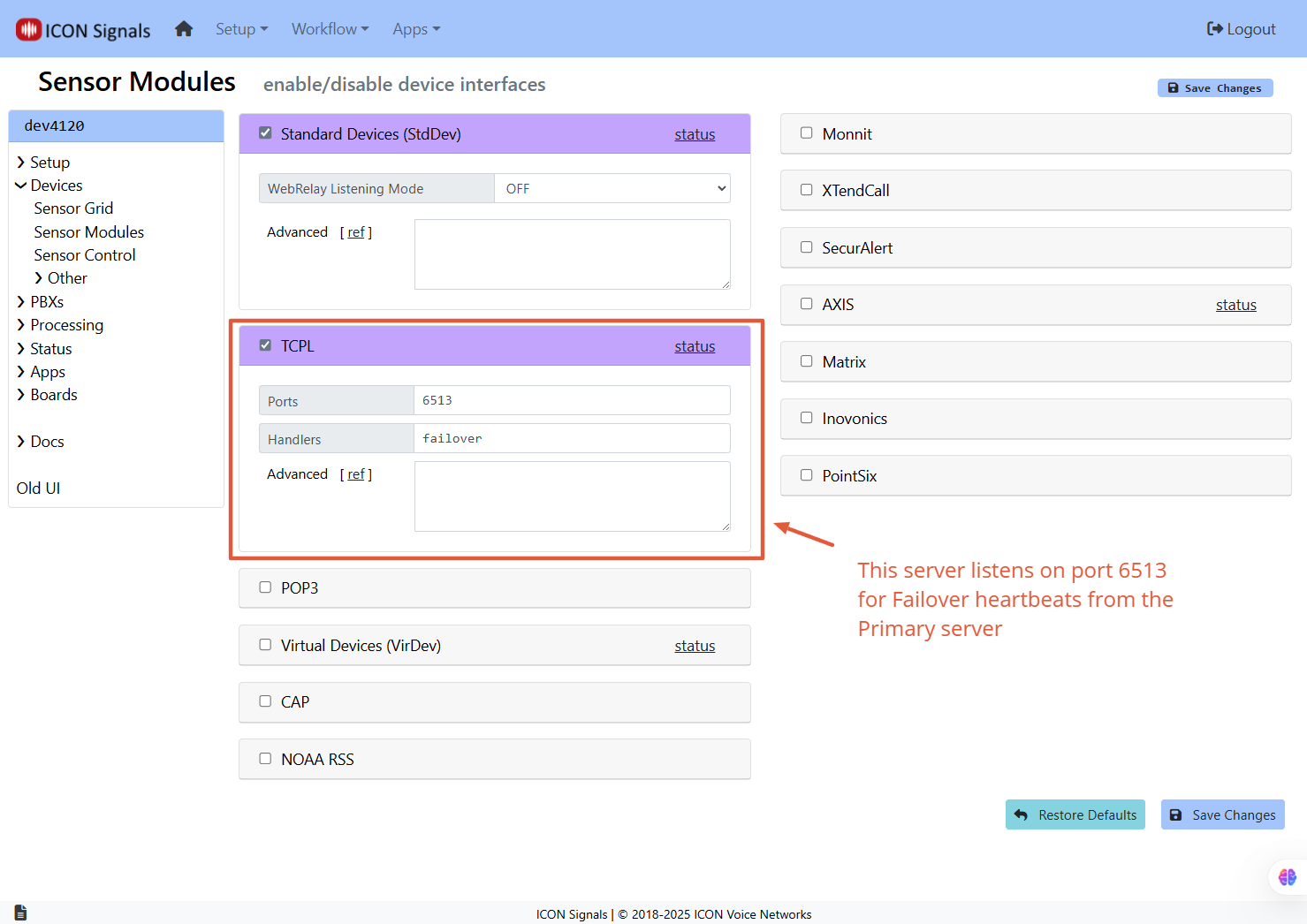
The TCP listener for Failover operations is configured on the Secondary Signals server in the Devices > Sensor Modules page as shown in the screenshot below. The port should 6511, 6512 or 6513.
If multiple listeners were configured, then both fields would have comma-separated values. For example:
Ports: 6511, 6512Handlers: securalert, failoverFailover configuration can be found in Setup > Advanced > Failover.
Figure 2.3-1 shows the primary server configuration.
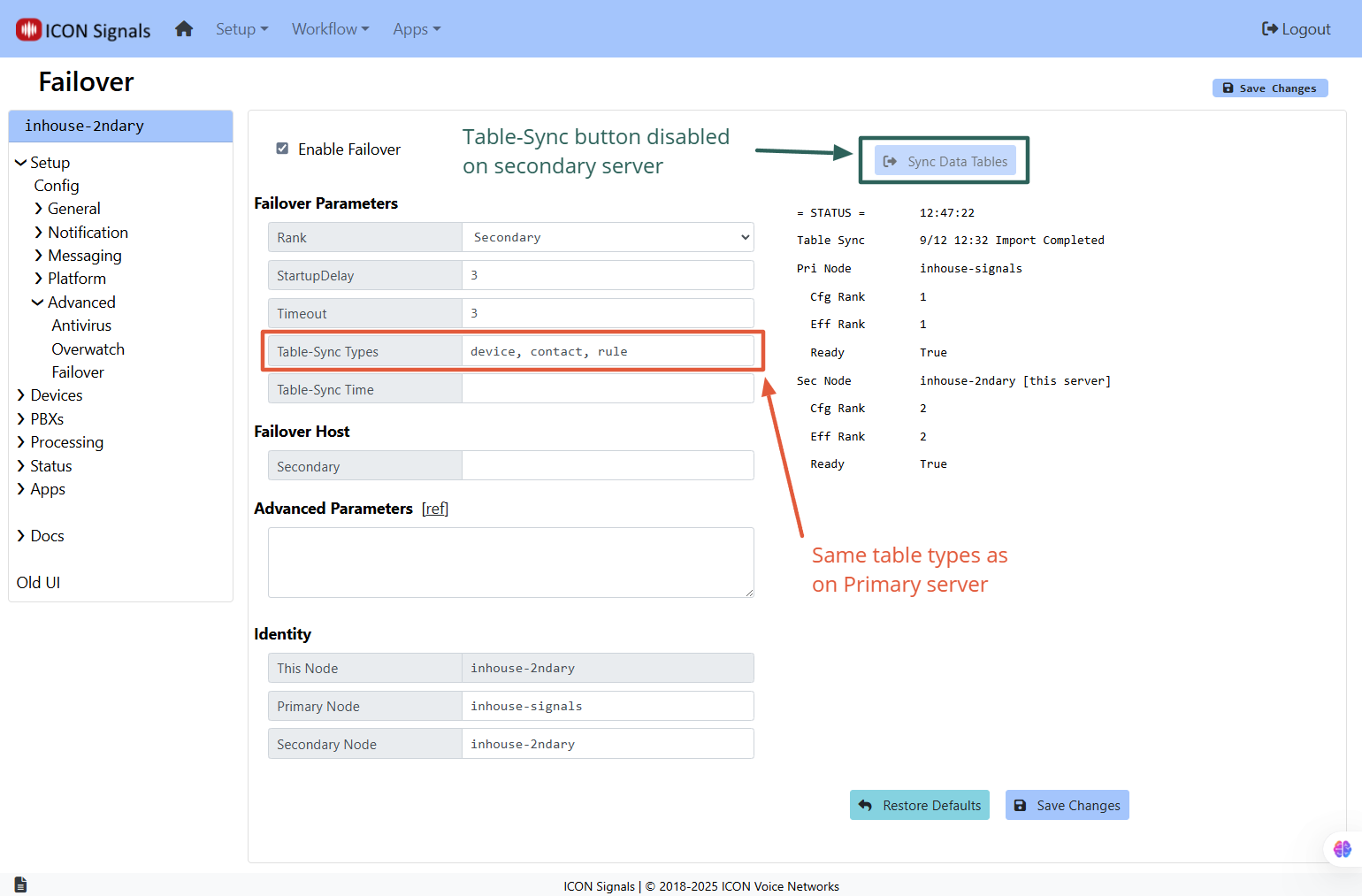
Figures 2.3-1 and 2.3-2 show the differences between the two configurations, but the basic ideas are:
The two servers must agree on which one is the primary and which is the secondary.
The primary server must have an address:port set in order to connect to the secondary server.
Failover is not operational unless both servers are "Ready" (i.e. have been online for some amount of time).
Database synchronization can be initiated from the primary server by pressing the Sync Data Tables button. It can also be configured to occur daily at a scheduled time.
2.3.1 Primary Server Parameters
In this example the primary server is Overwatch node dev4120 and the secondary server is node wat4120. Note that the fields in the Identity section are the same in the two screenshots.
The primary configuration involves setting the rank, startup delay and failover host parameters.
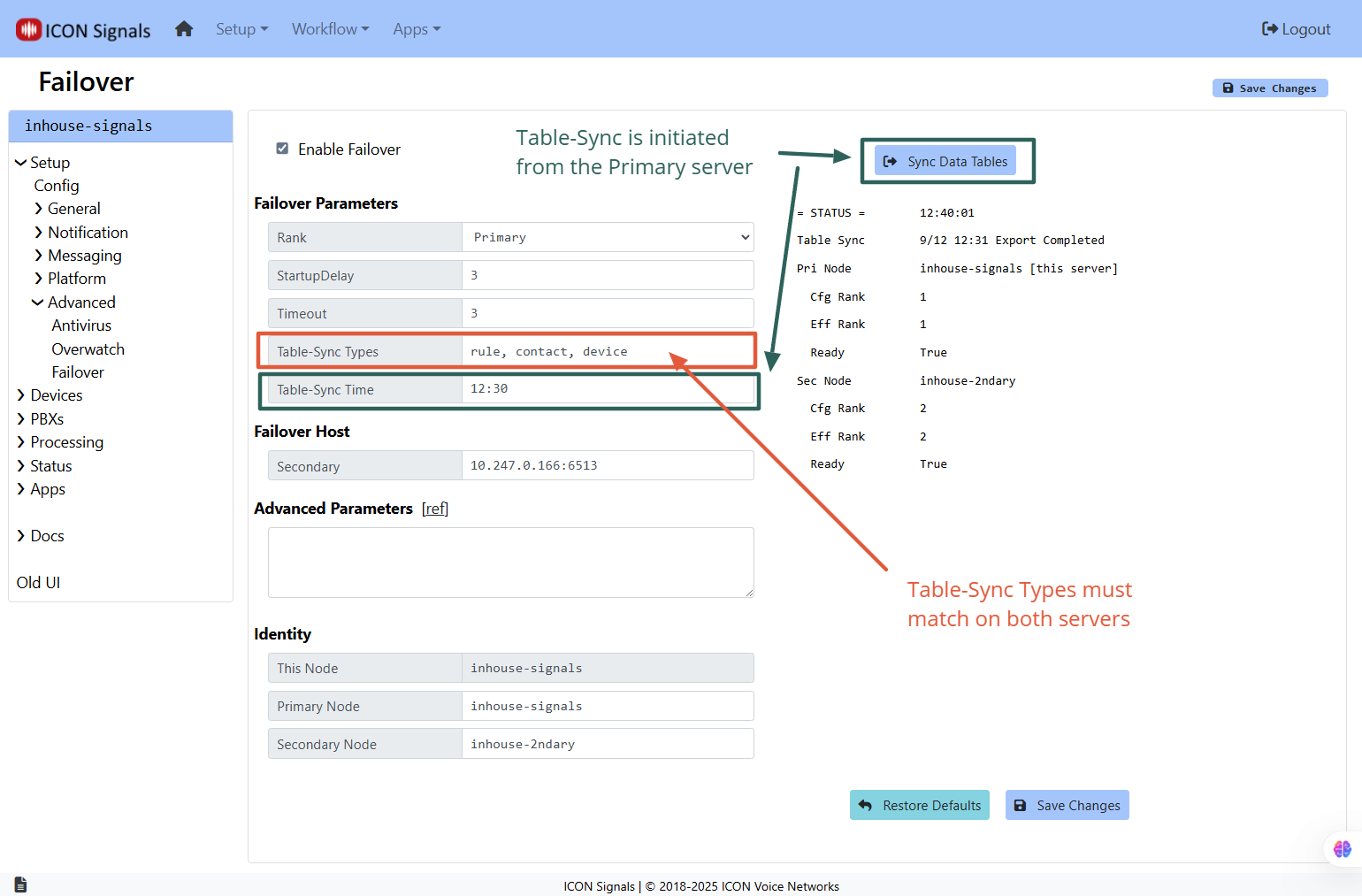
StartupDelay is the time in minutes that a server must be running before it can be involved in a failover operation. In other words, we want both servers to be up and running and in agreement before we will allow a secondary server to become the effective primary server.
2.3.2 Secondary Server Parameters
The secondary configuration also involves setting the rank and startup delay. The Timeout parameter matters for this server because it gives the primary server heartbeat expiration. Once that heartbeat expiration is reached, the secondary server assumes the primary server role.
2.3.3 Parameter Summary
| Name | Pri | Sec | Description |
|---|---|---|---|
| Rank | Y |
Y |
Configured rank for use in failover operations |
| Startup Delay | Y |
Y |
Time in minutes before failover system becomes operational on this server |
| Timeout | N |
Y |
Time in minutes before secondary server assumes primary operations |
| Table-Sync Time | Y |
N |
If set, performs a table sync operation daily at a given time (HH:MM format) |
| tblSyncTypes | Y |
Y |
See Section 4.0 on database table synchonization |
2.3.4 Advanced Parameters
Advanced Parameters currently only includes parameters used in a lab setting.
Possible future production advanced parameters include:
3.1.1 Both servers have a 20-second failover check timer.
3.1.2 During the failover check, the primary server connects to the secondary server if not already connected.
3.1.3 The primary server sends a heartbeat message to the secondary server every other failover check. The heartbeat expiry is set to 38 seconds.
3.1.4 The heartbeat is a small JSON message. In the future it may also contain rule and contact synchronization data.
3.1.5 Failover cannot occur unless both servers have been running for StartupDelay minutes - which can be set to different values on each server if desired.
3.1.6 After failover, the secondary server (now the effective primary) does not revert to its secondary role until it receives a heartbeat from the primary server. This applies even if the secondary server is restarted.
FAILOVER-ON / FAILOVER-OFF Signals3.2.1 When the secondary server assumes the primary role, immediately after enabling rule execution it raises a signal named FAILOVER-ON. A FAILOVER-ON rule can be written to notify IT personnel that the primary server has gone offline.
3.2.2 Similarly, when the primary server comes back online, the secondary server raises a signal named FAILOVER-OFF immediately before it disables rule execution.
3.2.3 These signals are only raised on the secondary server.
| Sequence of Conditions | Primary | Secondary |
|---|---|---|
| (1) Both servers started and running | FS=1 | FS=2 |
| (2) Secondary server stopped | FS=1 | FS=2 (stopped, no status update) |
| (3) Secondary server resumes | FS=1 | FS=2 |
| (4) Primary server stopped | FS=1 | FS=2 (until failoverTimeout expires) |
| (5) Primary server stopped | FS=1 | FS=1 (after failoverTimeout expires, rule exec enabled) |
| (6) Secondary also stopped | FS=1 | FS=1 (both stopped, no status update) |
| (7) Secondary server resumes | FS=1 | FS=1 (secondary FailoverState value retained on startup) |
| (8) Primary server resumes | FS=1 | FS=2 (rule exec disabled) |
To ensure consistency, configuration changes made to the primary server can be automatically synchronized with the secondary server. This feature is optional, allowing for scenarios where the servers require independent configurations. For instance, a customer might have primary and secondary servers that are each receiving data from different devices.
Specific database tables are copied from the primary server to the secondary server. The categories (or types) of tables which can be synchronized are shown in table 4.1.
| table type | description |
|---|---|
rule |
signal_rule, signal_script, etc. |
contact |
tables related to people, groups, locations and zones |
device |
sensor device tables |
pbx |
pbx_settings and voice_recording (metadata) |
text |
messaging provider tables |
all |
sync all of the supported table types |
Table synchronization cannot be initiated unless a number of preconditions are met.
4.2.1 Table-Sync types must match
Both servers must be in agreement on which types of database tables are to be exported from the primary server database and imported into the secondary server database.
4.2.2 Signals versions must match
The same Signals version must be installed on both primary and secondary servers. You can attempt to sync tables with mismatched version numbers, but the sync will fail. (See Figure 4.2.2 below.)
4.2.3 Servers must agree on their roles
The primary and secondary server identity configurations on the two servers must match.
4.2.4 Both servers must be in a 'Ready' state
This basically means that the two servers have both been online for a few minutes.
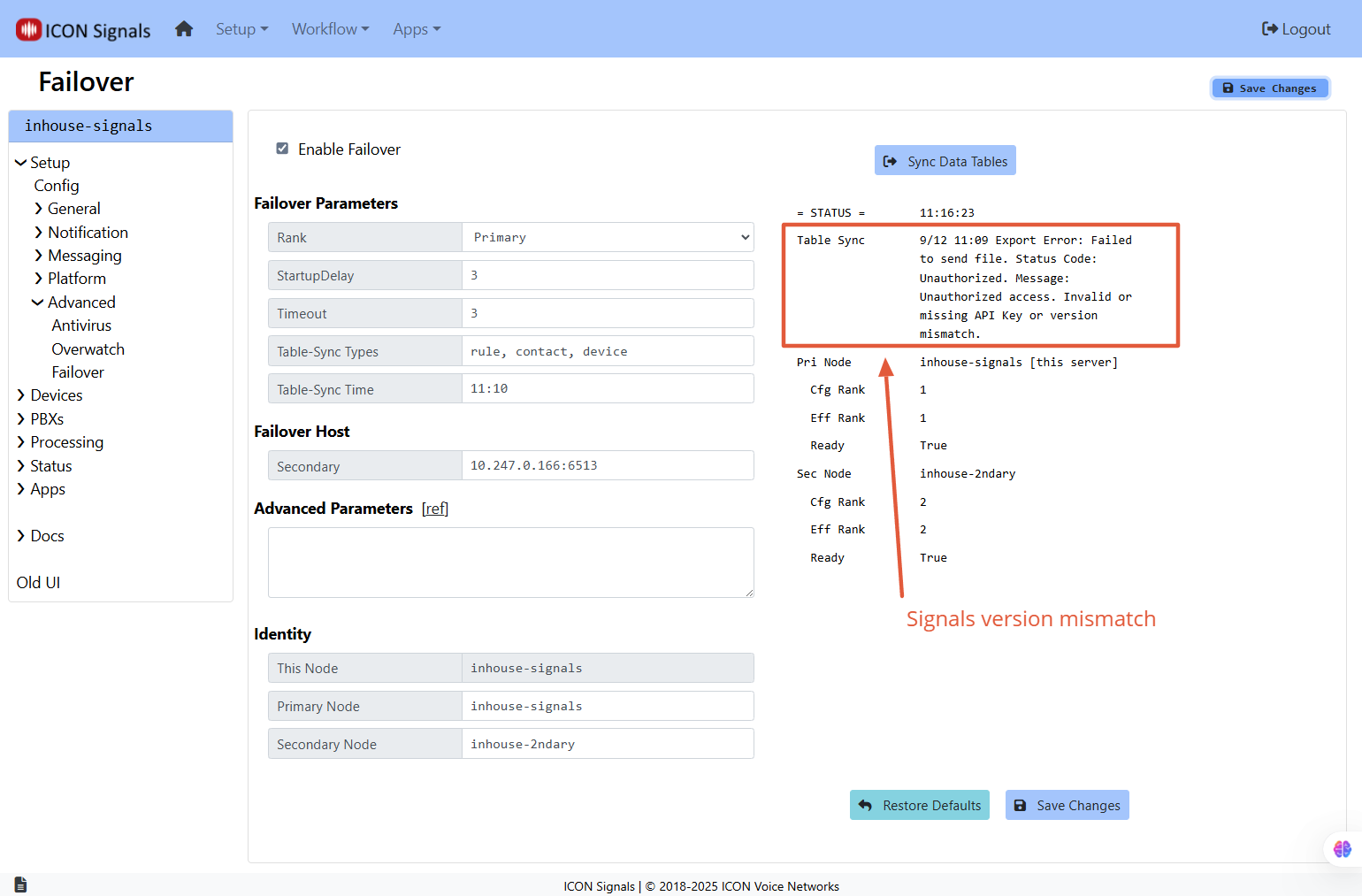
The steps in this section will be in reference to Figure 4.3, which shows the Setup > Advanced > Failover page for the primary server and highlights status information relevant to data synchronization.

4.3.1 Sync Data Tables button pressed, or Table-Sync Time elapsed
On the primary server, table synchronization should be configured to occur daily at a specified time. In addition, synchronization can be initiated manually from the Setup > Advanced > Failover page.
4.3.2 Primary server exports database tables
Data rows from the configured tables are dumped into a .sql file. We do not dump the database schema since this is not a full data + schema export.
4.3.3 Primary server compresses .sql file
4.3.4 Primary server sends compressed file to secondary server via HTTP POST.
4.3.6 Secondary server reads and decompresses the POST request data and writes it to a temporary file.
4.3.7 Secondary server truncates database tables and imports the SQL data from the POSTed file.
4.3.8 Secondary server restarts the Signals application.
The Signals server contains database tables and data files which are not synchronized. They are listed in this section.
4.4.1 Core Settings and Licensing tables
These tables include server-specific properties and are not copied to the secondary server.
4.4.2 Event data and Log files
The Signals server contains event data and log files associated with what the Signals application has received and what it has done. There should not be any question of "which server did what" when it comes to rule execution and notifications.
4.4.3 Recorded Voice Files
A database table containing metadata for the voice WAV files can be synchronized, but the WAV files themselves currently are not copied to the secondary server. This is something that might change in the future.
Here's a list of shortcomings I can think of at this time. Some of these will be investigated and possibly addressed in the future.
When a secondary server is activated and running in a primary mode, there is a short period of time (less than a minute) after the primary server resumes running and before the secondary server receives status from it. Events received during this interval can be processed by both servers since the secondary server is still operating in primary mode (FailoverState=1).
For example, webrelay devices. I investigated on-the-fly configuration options, but didn't find anything workable.
Possibly some sort of internal DNS switcher could help with 2. and 3.
ICON Signals | 2018-2025 ICON Voice Networks