| date | desc |
|---|---|
| 27 Jun 2025 | initial |
TextTalk is a Text-to-Rainbow integration within ICON Signals.
Messages are proxied back and forth between Rainbow bubbles and mobile devices (or website chat widgets).
There are several possible modes of operation. In this document, we will describe an implementation that brings SMS capabilities to users at a customer site using NUSO phone numbers.
We will consider communication between a mobile phone user and staff members with Rainbow accounts.
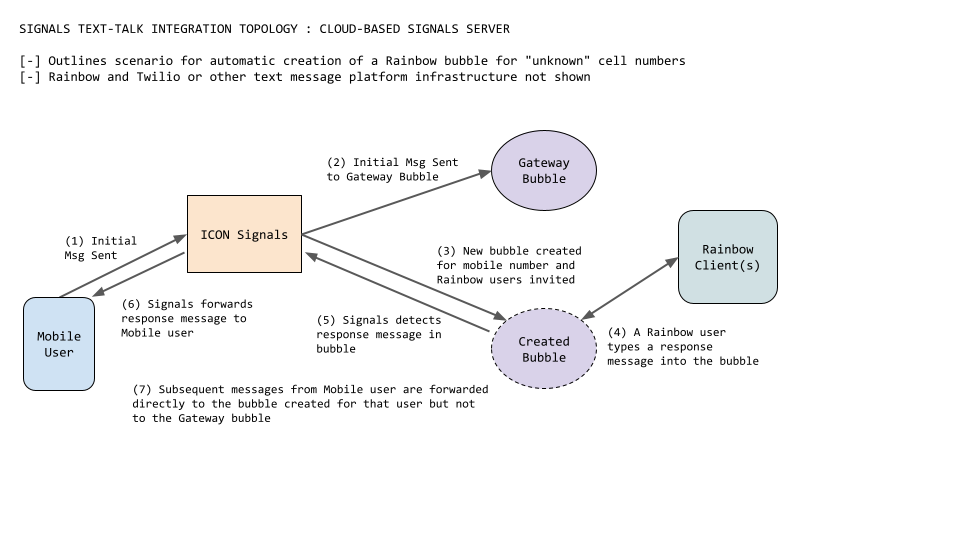
(1) A message from an unknown mobile number is received by Signals.
(2) Signals sends the message to a configured Gateway Bubble
(3) Signals creates and configures a new bubble and associates it with the mobile number
At the core of the TextTalk application is a mapping between individual cell phone numbers and Rainbow bubbles. These mappings are stored in the Signals integration table. Additional configuration in the integration table includes the details of bubble management.
If there is no mapping for an incoming text message (i.e. an unknown cell number), then Signals does the following:
At the end of this process, a staff member should own the bubble and have the ability to rename it, delete it, or send invitations to additional Rainbow users.
(4) Staff members enter text into the newly created bubble
(5) & (6) Signals detects response messages from bubble users and sends them back to the originating mobile number
(7) Additional messages sent by the mobile user are sent directly to the newly created bubble
The Gateway Bubble dates back to early work on the TextTalk integration. It can be configured to support manual instead of automatic creation of bubbles. This option may not be desirable, but the Gateway Bubble remains a part of TextTalk use because it can also be used to send the initial message to "unknown" mobile numbers.
A Signals server uses a NUSO API to send outgoing SMS messages to mobile users.
                           +-----------------+
                           |       NUSO      |
                           |                 |
+---------+    SMS msg     |-----+           |
| Signals +--------------->| SMS |           |
| Server  |  via http(s)   | SVC |           |
+---------+                +-----------------+
Incoming messages arrive at NUSO from the carriers of mobile users. NUSO then sends the SMS data to an Endpoint API maintained by ICON. The endpoint application then sends the data to the destination Signals server for that NUSO number.
                                          +---------+
                                          | Mobile  |
                                          | User's  |
   +-----------+    SMS data              | Carrier |
   | IconCloud |<----------------+        +------+--+
   | Endpoint  |   via http(s)   |               |
   +-+---------+                 |               |
     |                           |               |
     |                   +-----------------+     | Incoming
SMS  |                   |       NUSO      |     | SMS msg
data |                   |                 |     |
     |  +---------+      |-----+           |<----+
     +->| Signals |      | SMS |           |
        | Server  |      | SVC |           |
        +---------+      +-----------------+
This section deals with setting up NUSO numbers for SMS integration. The assumptions are:
The NUSO numbers have been configured within the NUSO Dashboard.
The IconCloud Endpoint has been configured to support sending incoming NUSO SMS and MMS messages to the destination Signals server.
The Signals server is configured and licensed for Rainbow integration with a Rainbow account.
Each NUSO-SMS user is configured as a Rainbow user.
Each NUSO-SMS user has a contact record in Signals.
The contact record has the Rainbow Commands (RbC) attribute set.
For each NUSO-SMS user, the email address for their Signals contact record and their Rainbow user account are the same.
Section 3.1 illustrates configuring numbers in the NUSO dashboard for SMS and MMS.
Section 3.2 deals with configuring the NUSO numbers in the IconCloud endpoint.
Section 3.3 covers configuring NUSO numbers and users within the Signals server and Rainbow client.
(3.1.1) Add Number to SMS (TBD)
TBD
(3.1.2) Modify number for SMS
Voice (#) > Modify Number FeaturesContinueMessaging tabSMS_RAINBOWHUB_ICON and ICON_GLOBAL in the SMS and MMS dropdownsSubmit ChangesNumbers in NUSO don't include any metadata that can be used to identity the destination Signals server. So, the cloud-based endpoint application must use a cloud-based database to look up that information.
+-----------+   SMS data           +-----------+
|   NUSO    +--------------------->| IconCloud +-------------+
|           |  {to=19724622641,    | Endpoint  |<--------+   |
+-----------+   from=18175551234   +-+------+--+         |   |{to=
                text=Hello Bob!}            |            |   | 19724622641}
                                            |  {site=    |   |
                                            |   mayberry}|   |
                                            |            |   v
                +----------+                |         +--+-------+
                | mayberry |                |         | Endpoint |
                | Signals  |<---------------+         | Cloud    |
                | Server   |                          | Database |
                +----------+                          +----------+
Incoming SMS data from NUSO contains the destination to number. The endpoint application looks up this number in the cloud database and then forwards the incoming SMS request to the destination Signals site.
A (primitive) web page enables ICON personnel to configure number records in the cloud database. This web page can be found on the internal Signals server:
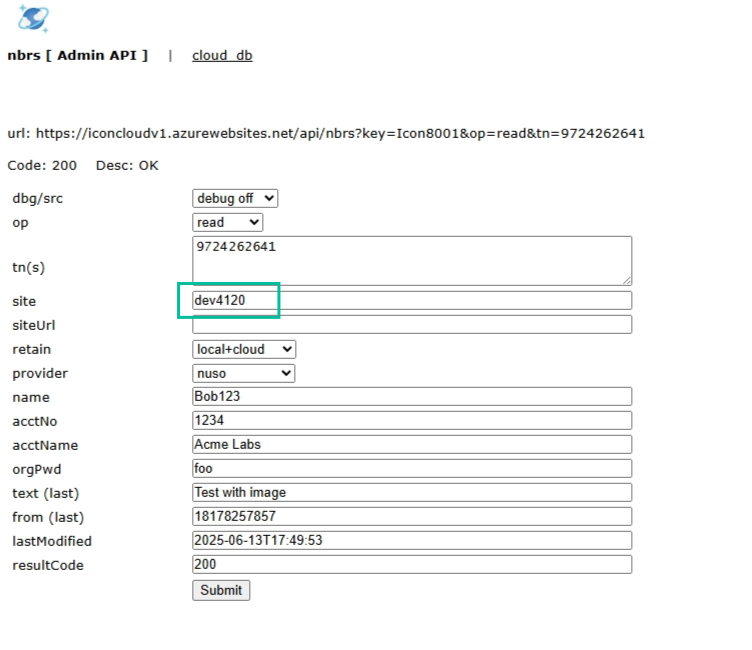
The page has the following characteristics.
The tn(s) field is a text area. Multiple space or comma separated numbers can be entered here.
Caveat: this will probably only be useful for initially entering numbers. It needs safeguards for making updates.
NOTE: None of this information is read from NUSO. There are no metadata fields available within NUSO to identify the customer. (I'm not counting the CNAM data for the phone number.)
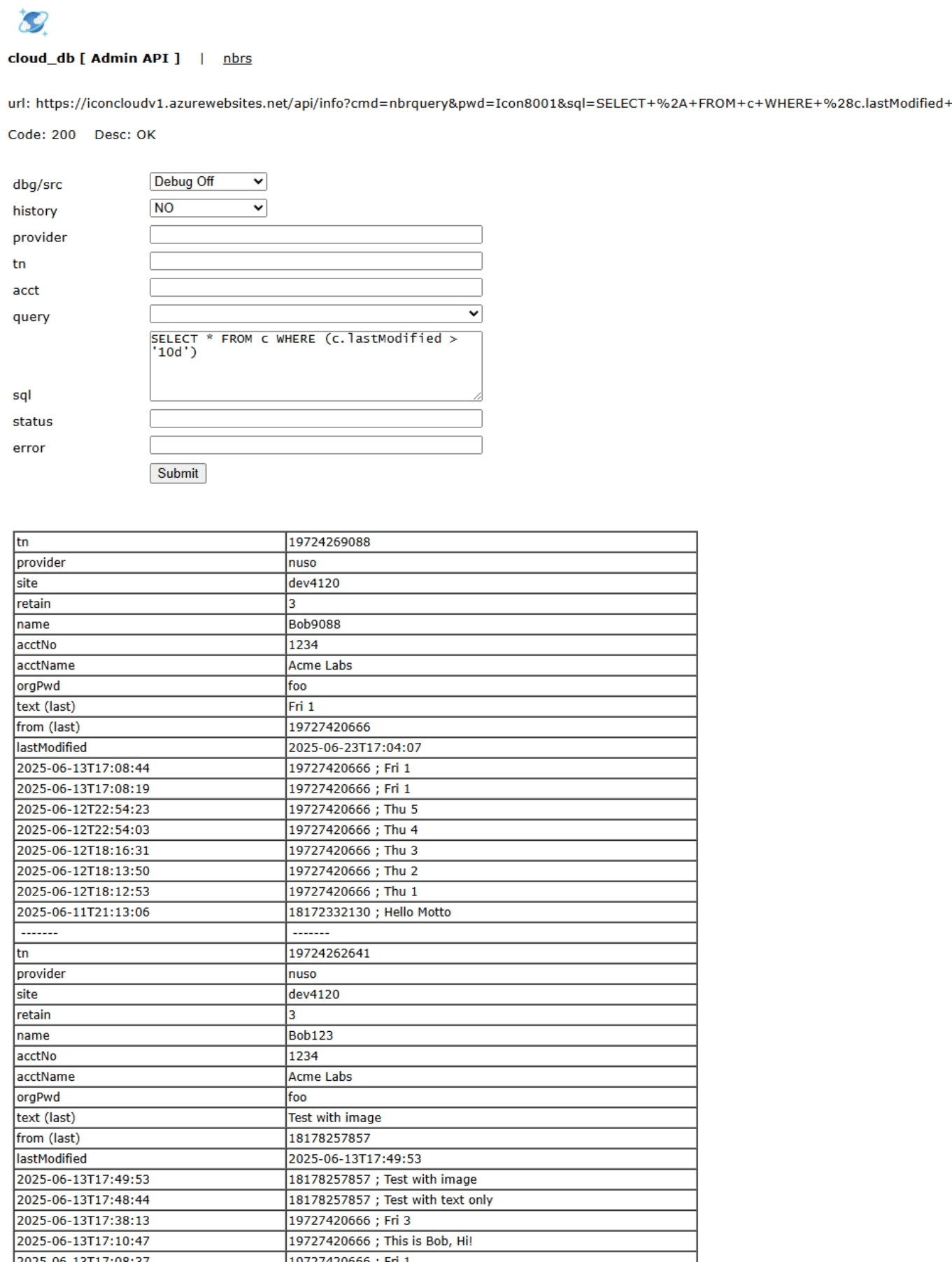
A separate page allows the user to perform some basic queries to retrieve records for a specific account or for records modified recently.
(3.3.1) Integration Names
TextTalk uses the Signals integration table. It is enabled by adding the follow two integration names in Processing > Other > Integration Names.
text_talktext_talk_cfg(3.3.2) Code Flags: -textmgr- string
In Setup > Platform > Environment the Code Flags field must include the string:
-textmgr-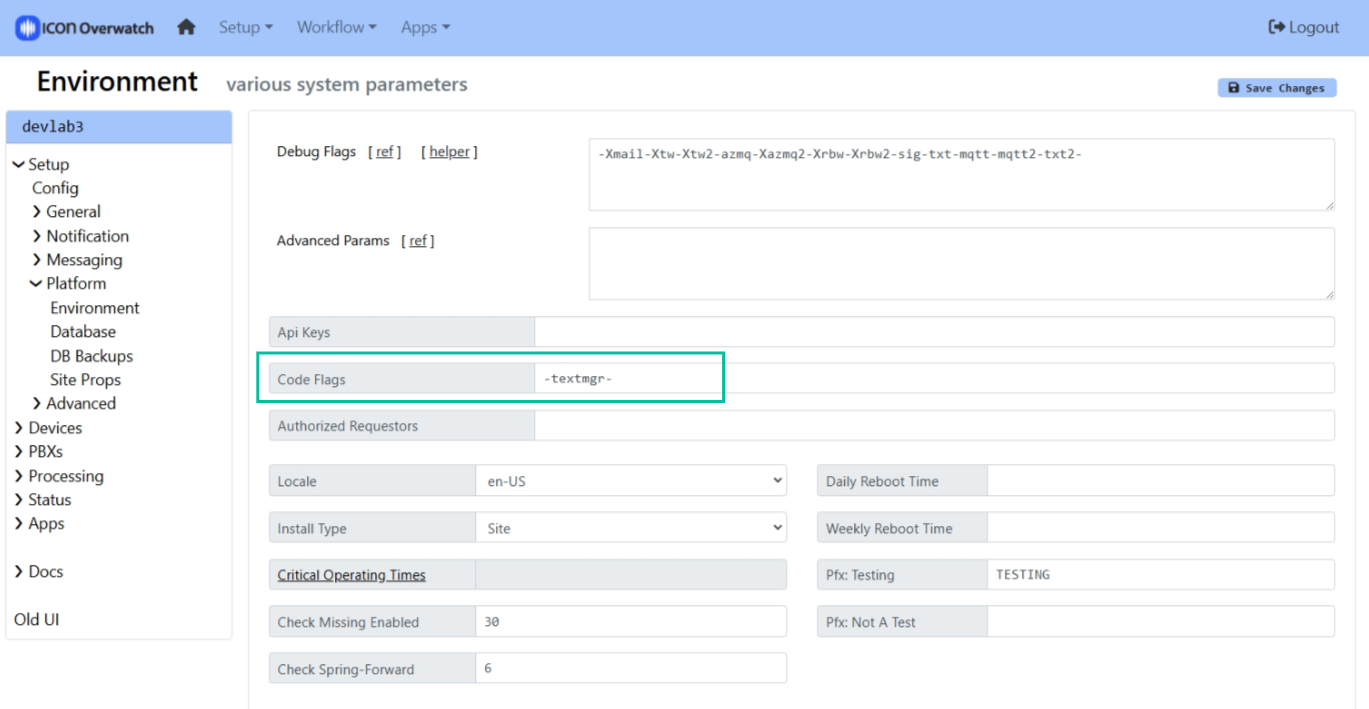
Restart Signals if you add this string to the Code Flags value.
(3.3.3) Text Provider
In Setup > Messaging > Text Providers, configure a NUSO text provider.
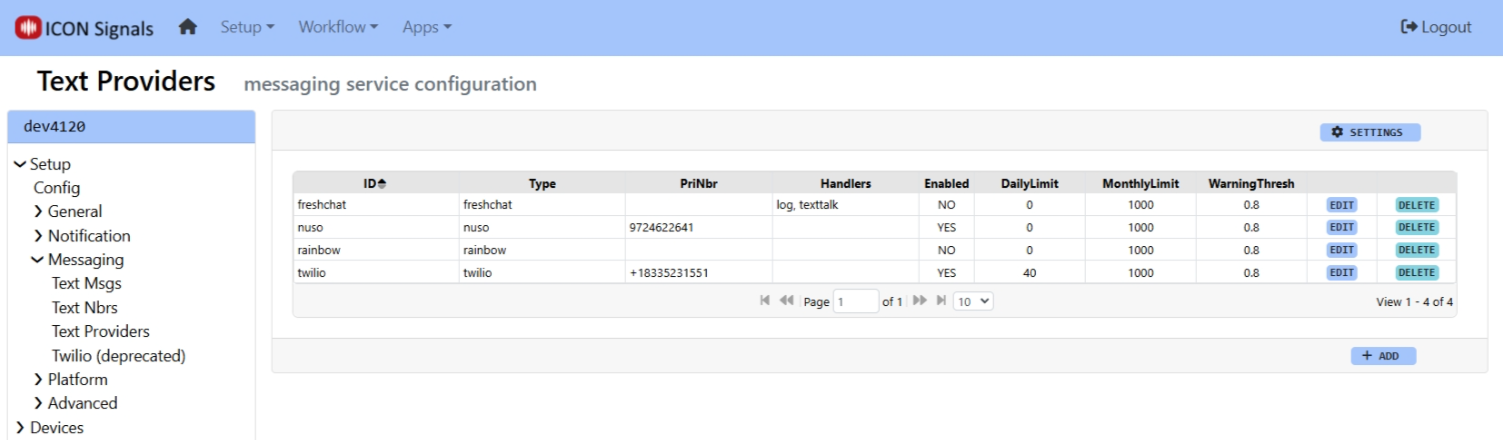
Side Note:
This is an important detail for alert processing in Signals, but probably not for a typical TextTalk configuration.
If there is more than one SMS provider, an Advanced Parameter can be set to choose the default provider for outgoing SMS messages. The lowest value for outgoingPriority indicates which provider and default DID will be used for outgoing SMS within Signals rules.
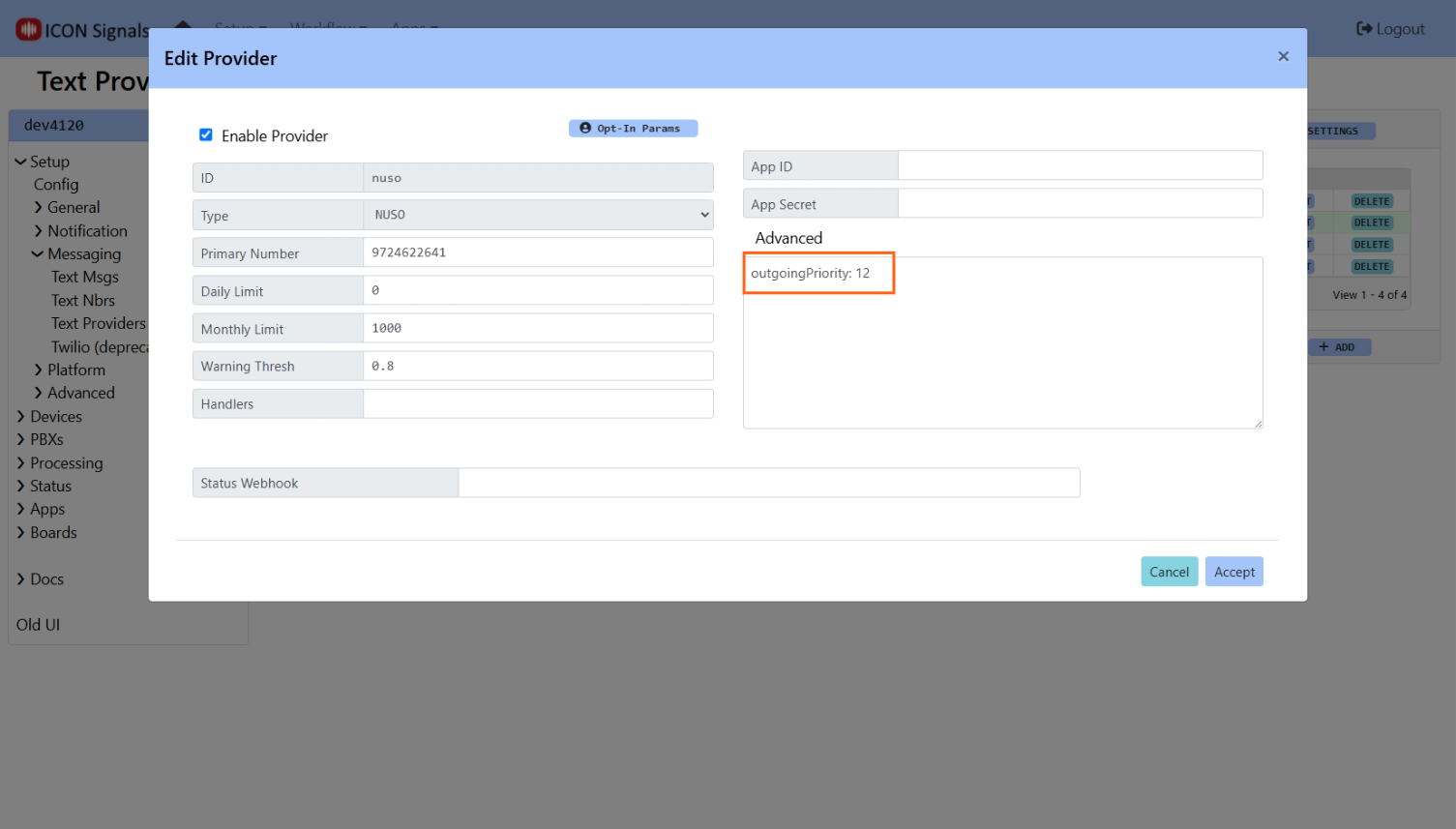
(3.3.4) Text Number
In Setup > Messaging > Text Nbrs, configure a NUSO number to be used for SMS.
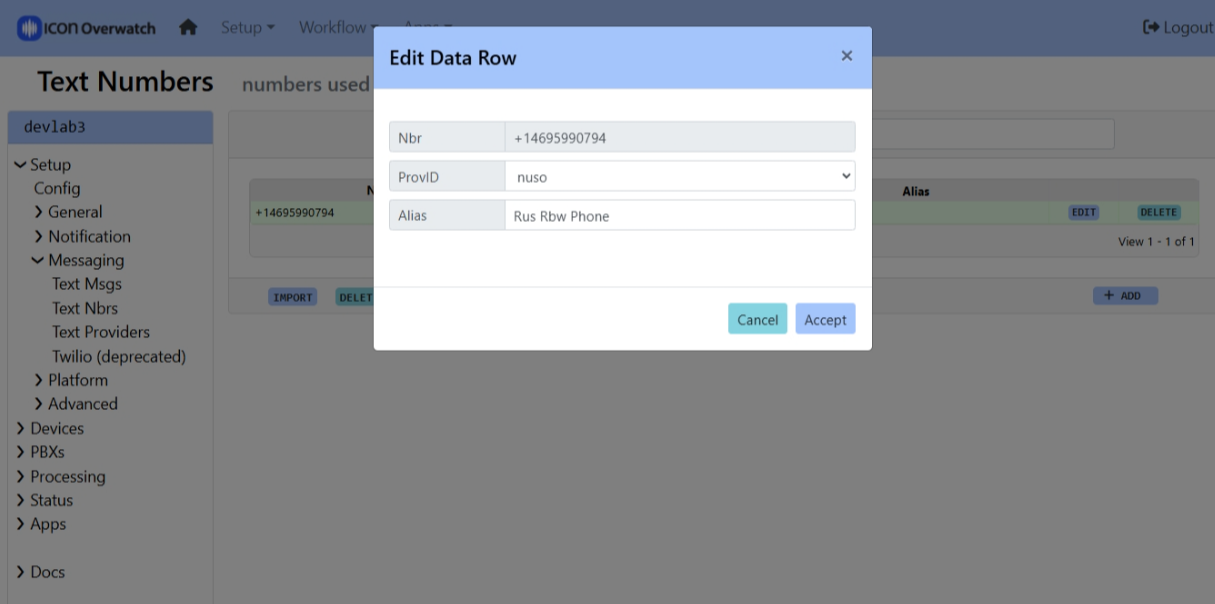
NOTE: The number must be in E.164 format. For North America that means:
+1 followed by {10-digit number}(3.3.5) Create a Rainbow bubble for the NUSO number
This bubble will serve as a "gateway" for incoming messages to the NUSO number from unknown mobile numbers.
Invite the Signals Rainbow account to the bubble. You can find the email address for the Rainbow account in PBXs > Alcatel Rainbow > Rainbow Cfg.
(3.3.6) Configure the bubble for TextTalk
PBXs > Alcatel Rainbow > Bubble InfoThe newly created bubble should appear in the grid. click the REFRESH button if you don't see it.
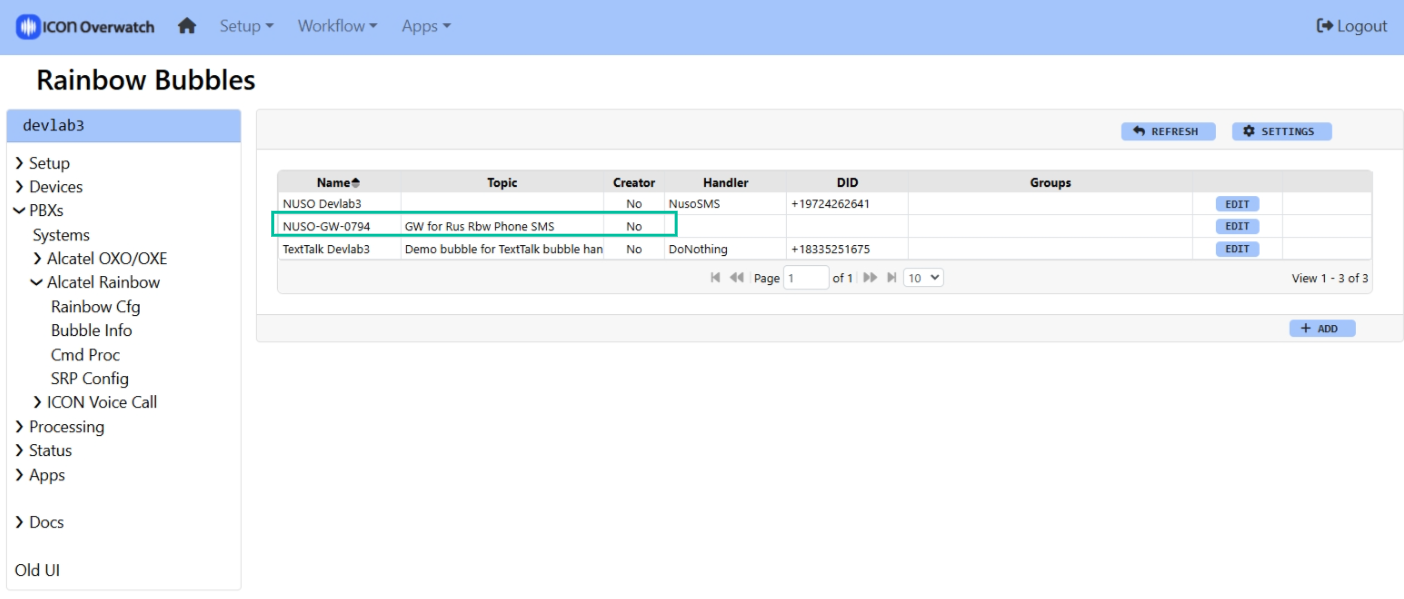
Edit the bubble parameters.
accept:1, auto:1TextTalk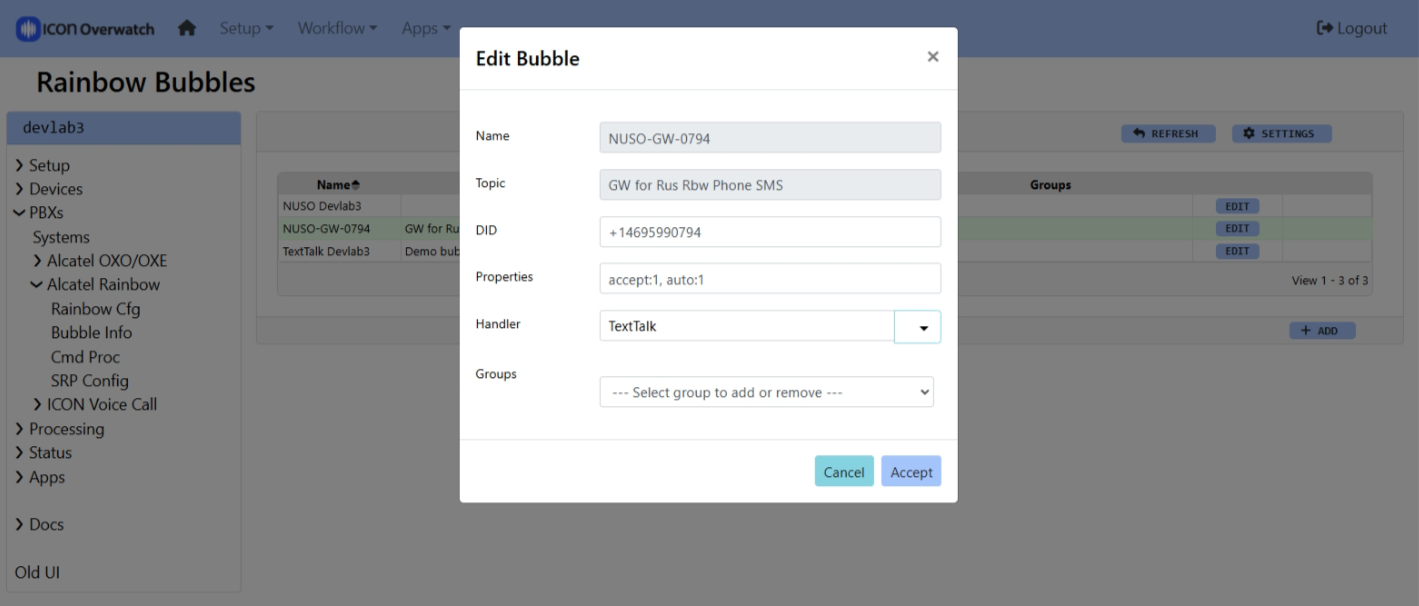
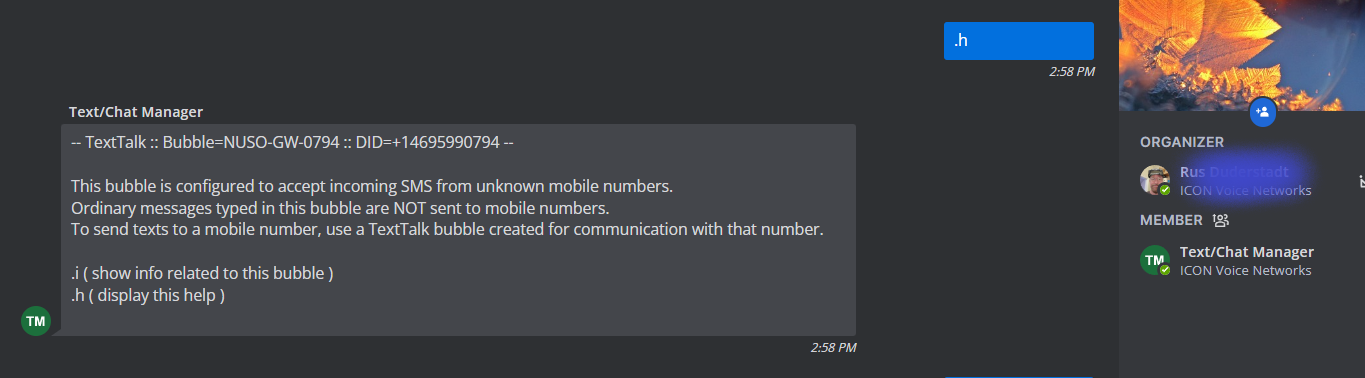
(3.3.7) Go to the bubble in the Rainbow client
? or .hYou should see a response similar to this.
(3.3.8) Send an SMS message to the Mobile user
.s {Mobile Number} {Text Message}A successful result indicates that the Text Provider for NUSO and the Text Number for this number have been set up correctly.
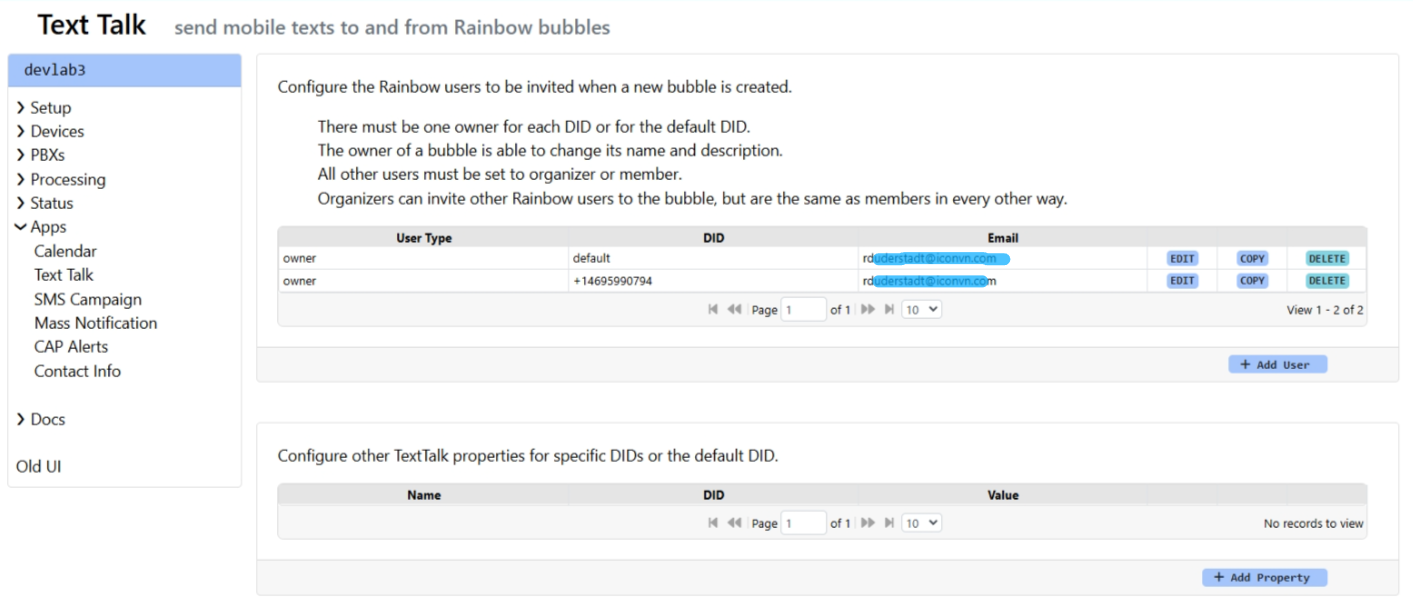
(3.3.9) Configure owner and members for the NUSO-SMS bubbles
This step can also be done by the customer, but is included here as part of a basic two-way functional test.
Go to Apps > TextTalk
Configure exactly one owner for the NUSO-SMS number bubbles
If not already done, configure a default owner for TextTalk bubbles
Optionally configure one or more moderators or members for bubbles
(3.3.10) Verify incoming SMS functionality
Send an SMS message to the NUSO-SMS number
Verify that Signals creates a Rainbow bubble, invites the configured Rainbow users, and transfers ownership to the appropriate user.
Verify that messages types in the bubble are sent to the mobile user.
Verify that SMS messages sent by the mobile user are received in the bubble.
At this point gateway bubbles are configured and verified for the NUSO numbers.
Remaining configuration takes place in Apps > TextTalk.
Ownership and membership of created bubbles is handled in the top grid.
Other TextTalk properties are configured in the bottom grid.
(4.0.1) Define owner, moderators and members for each NUSO number
For each NUSO number there should be exactly one owner. Moderators and members are optional.
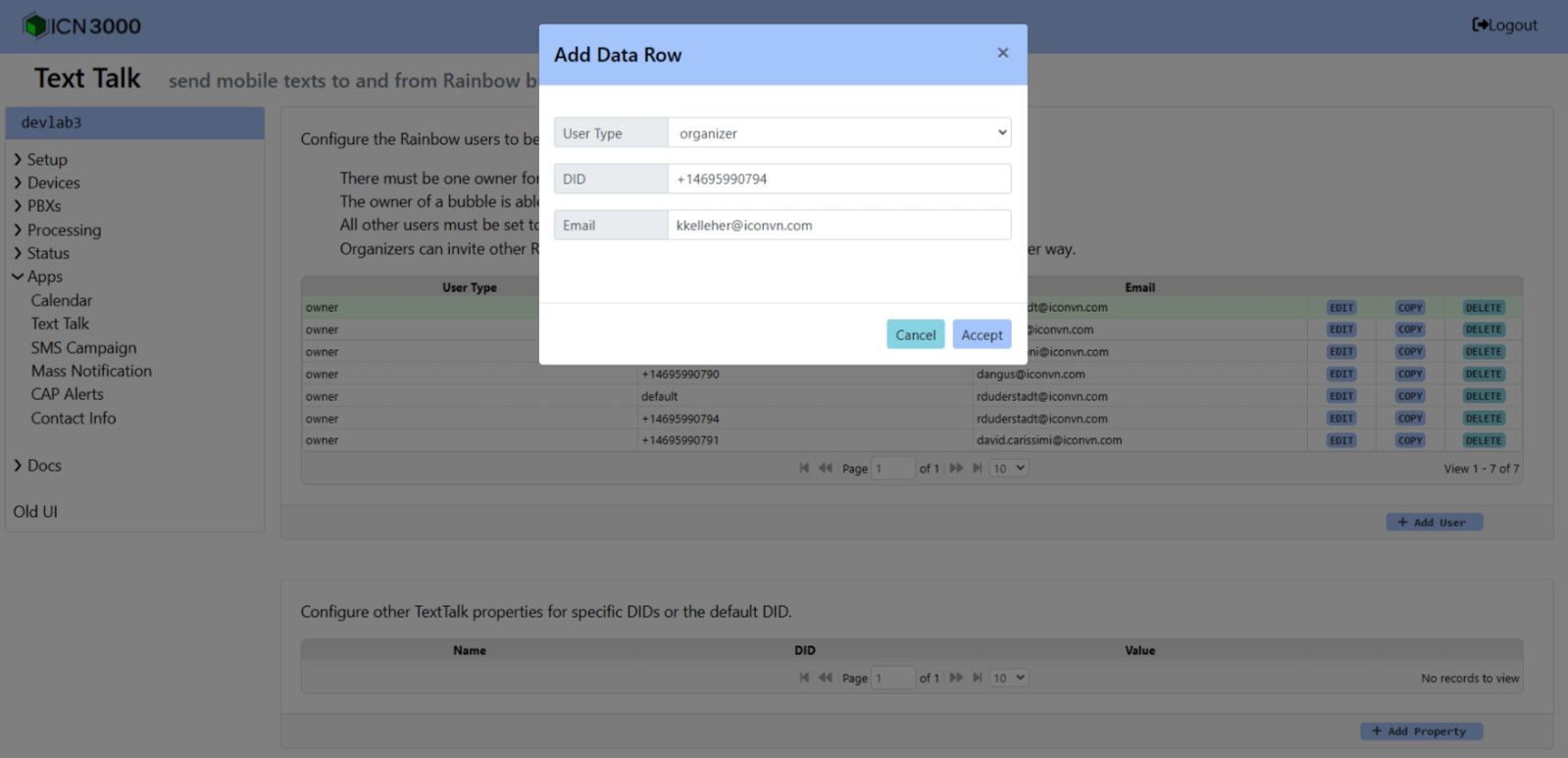
Default owner/moderator(s)/member(s) config settings can also be made. This may be useful for testing or for when all bubbles will have the same membership.
(4.0.2) Configure other TextTalk properties
Bubble Name
The most commonly-configured TextTalk property is the name of the bubbles to be created for an individual NUSO number. The default bubble name is:
SMS:{last four digits of NUSO number} {mobile number}Newly-created bubble names should contain information about both the NUSO number (or its owner) and the mobile user. Once created, the bubble owner is free to change the bubble name within the Rainbow client.

Welcome Message
This property is a work-in-progress and probably only useful for NUSO numbers that are managed by a group of people that receive unsolicited texts.
It will probably be re-worked in the future. The current implementation is complicated and error-prone.
ICON Signals, and by extension TextTalk-NUSO, integrates loosely with a standalone service using Rainbow SDK for Node.js. This makes it difficult to handle Rainbow events within the core Signals engine.
A long-overdue effort to instead use the C# Rainbow library should lead to a number of improvements in the Rainbow integration. For example:
Another area of work will involve handling of both incoming and outgoing images (MMS).
2018-2025 ICON Voice Networks