| date | desc |
|---|---|
| 3 Oct 2024 | Initial |
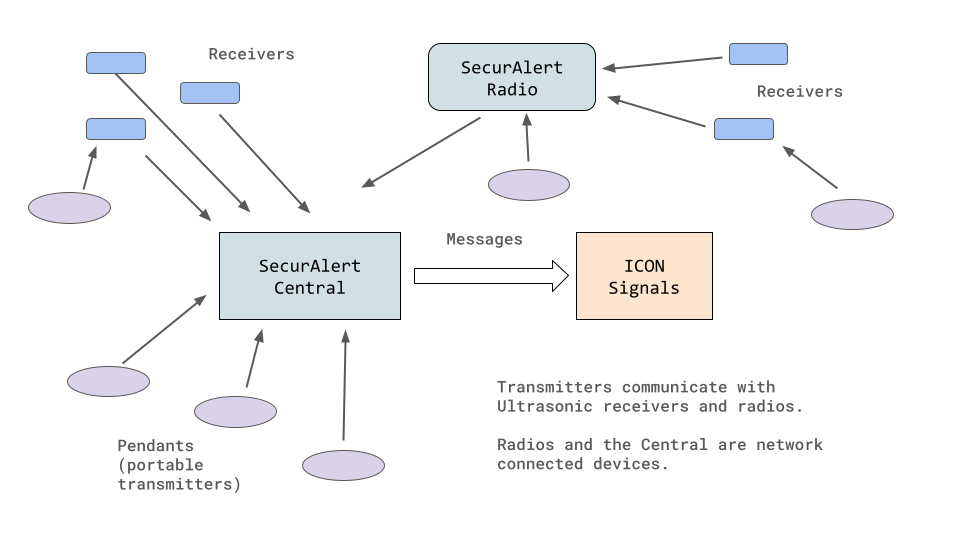
The SecurAlert server (known as a "Central") manages pendants, ultrasonic receivers, repeaters and radio transceivers. It can be configured to send device events to an ICON Signals server.
This document covers the details of converting messages sent from SecurAlert into something that Signals can use and explaining how Signals can make use that data. Another document (link at top of page) covers topics related to setting up the SecurAlert system itself.
We will deal with the following systems and devices.
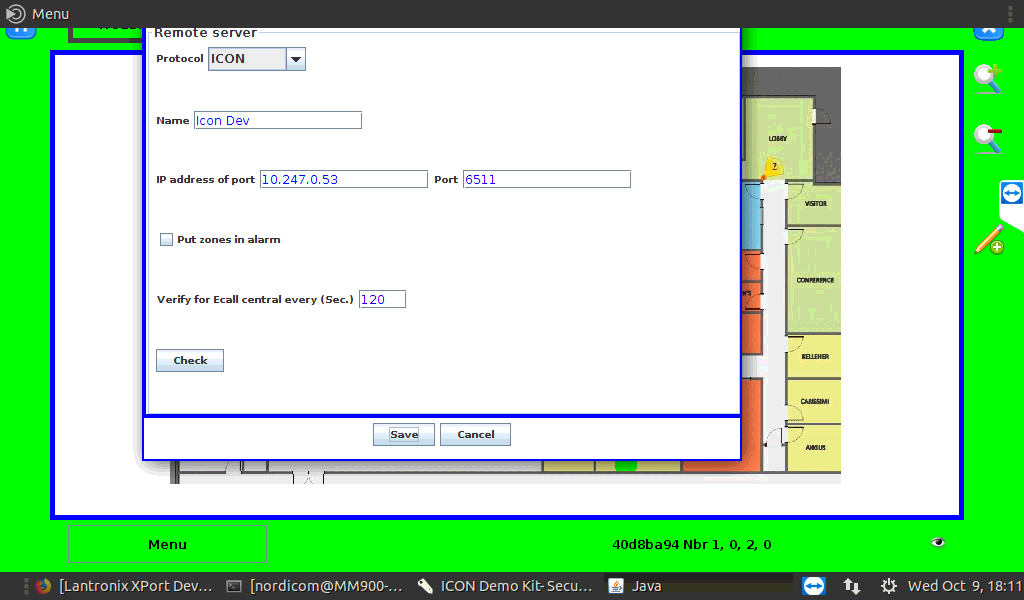
The SecureAlert Central opens a TCP connection to ICON Signals and sends JSON-encoded messages. The ICON configuration can be found in:
Application settings > Server settings > External module settings > Remote server (checked) Config
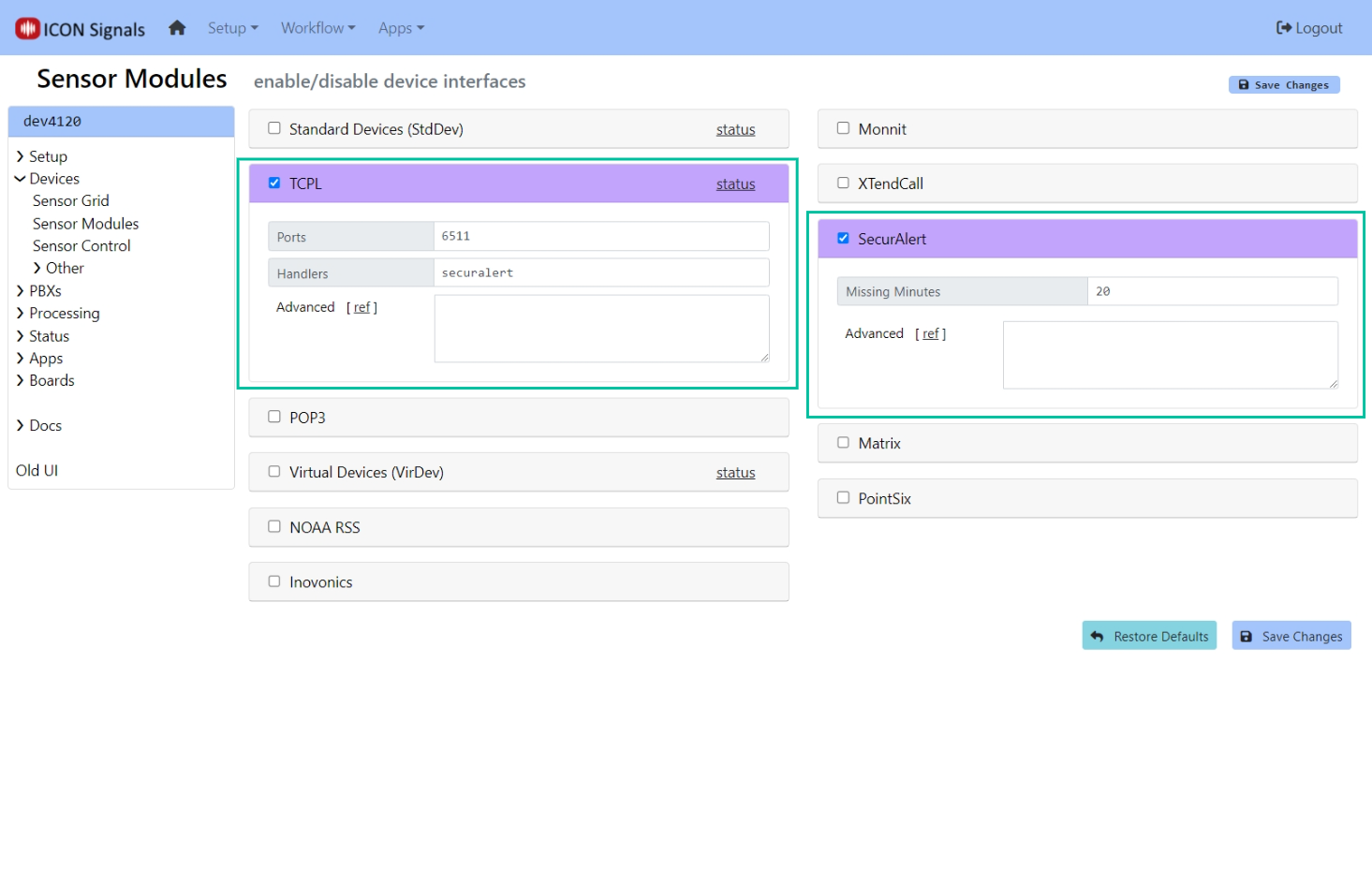
Within the Signals UI, we enable and configure the TCP Listeners (TCPL) and SecutAlert modules as shown below.
SecurAlert shares some message details with XTendCall, but the transmission mechanism is different and most of the message details are different.
Every message from the SecurAlert Central has the following properties:
ObjectIDProductIDObjectID is the message type. ProductId is a unique ID for the SecurAlert central generating the messages. Most property values (including these two) are Base64 encoded.
The SecurAlert central sends two messages to a Signals server.
| ObjectID | Description |
|---|---|
TPingObject |
A "keep-alive" message from the SecurAlert server. Contains no alarm status information. |
TAlarmStatus |
An ON/OFF alarm status message for a single output (priority) within a single callpoint (pendant or receiver). |
The TPingObject message is sent every two minutes. This enables us to creating "Missing" and "Found" rules for the SecurAlert Central to monitor whether or not it is online.
NOTE: Signals does not track missing / found status for individual devices (callpoints) associated with either the XTendCall or SecurAlert platform. With XTendCall, we do not receive periodic status updates. It is possible to receive status updates for SecurAlert devices, so it is possible this may be supported in the future.
All messages other than the once-per-two-minutes TPingObject message sent by the SecurAlert Central are TAlarmStatus messages. These messages are sent when a callpoint priority changes state or when the SecurAlert software is first started and connects to ICON Signals.
In addition to ObjectID and ProductId, TAlarmStatus messages have the following properties:
| Property | Description |
|---|---|
DeviceType |
The SecurAlert device type. Pendants are type 3. Receivers are type 0. All other device types are currently ignored by Signals. |
DeviceID |
A lowercase 8-hex-digit device identifier unique for the SecurAlert site. |
DeviceName |
A name associated with the SecurAlert device. |
LocationID |
Location name |
EventName1 |
Event Priority |
Activation |
Alarm state value, either True or False. This is the only property value that is not Base64-encoded. |
Most TAlarmStatus messages are not relevant to ICON Signals. We are interested in messages for specific device types and event priorities.
EventName1 values shown in the table below.
| Value | Meaning |
|---|---|
| 100 | Alarm |
| 101 | Secondary Alarm |
| 110 | Alarm ACK |
| 200 | Trouble Code |
| 999 | All Inputs (used to clear all alarms) |
What follows are relevant message sequences for the primary alarms triggered via radio and ultrasonic signal as well as via the SecurAlert UI. Additional messages are sent by the SecurAlert Central, but are discarded by ICON Signals.
SecurAlert[ ObjectID="TAlarmStatus" DeviceType="3"
 DeviceID="41c157d7" DeviceName="Pendt 2" Rmt LocationID="Zone 2"
 EventName1="100" Activation=True ProductId="2413-a200-4129-d3ce" ]
SecurAlert[ ObjectID=TAlarmStatus DeviceType=3
 DeviceID=41c157d7 DeviceName=Pendt 2 Rmt LocationID=Zone 2
 EventName1=999 Activation=False
 AdditionalText=Running ProductId=2413-a200-4129-d3ce ]


SecurAlert[ ObjectID=TAlarmStatus DeviceType=0
 DeviceID=40aacde5 DeviceName=Rcvr 2 Remote LocationID=41c157d7
 EventName1=100 Activation=True ProductId=2413-a200-4129-d3ce ]
This is generated by clicking on a receiver on the UI map and selecting 'Start alarm' in the dropdown.
SecurAlert[ ObjectID=TAlarmStatus DeviceType=0 DeviceID=40aacde5
 DeviceName=Rcvr 2 Remote LocationID=40aacde5
 EventName1=100 Activation=True ProductId=2413-a200-4129-d3ce ]
A SecurAlert TAlarmStatus message contains an 8-hex-digit DeviceID value which is unique for that server. ICON Signals uses the SercurAlert ProductId and DeviceID values to construct its own ID value for each device. Consequently, it is possible to have multiple SecurAlert centrals sending events to one Signals server.
As previously mentioned, Signals processes messages for:
Devices are created on-the-fly within the Signals database if they don't already exist. The device IO channel corresponding to a SecurAlert priority is also created on-the-fly if it doesn't exist.
The Integration Table provides a mapping between the ProductId in the SecurAlert message and the specific SecurAlert server device ID within the Signals Sensor Grid.
An advanced parameter setting in the SecurAlert configuration section of Signals can also force the use of a specific ProductId to treat all incoming messages as if they were from the same SecurAlert server.
Pendants (transmitters) are mobile devices and their locations may change.
Ultrasonic receivers are stationary devices with tamper detection mechanisms. Normally these devices are affixed to flat surfaces such as walls.
Within Signals you can set location data in the same way as other devices using the Signals UI.
However, since a site can have a large number of devices, a data integration name-loc-zone-cam can be used to fill in information for receivers that don't yet have any location data. The format of this integration data follows:
| Field | Description |
|---|---|
| Name | the integration name (in this case, name-loc-zon-cam) |
| C0 | the receiver name |
| C1 | the location name |
| C2 | the zone name |
| C3 | the camera ID |
Example data:
| Name | C0 | C1 | C2 | C3 |
|---|---|---|---|---|
| name-loc-zon-cam | R41b650b9 | Mayberry High | Rm C104 | CAM-HS-3 |
| name-loc-zon-cam | R41baa66b | Mayberry MS | West Hall | CAM-MS-1 |
| name-loc-zon-cam | R41b650b9 | Mayberry MS | Rm A200 | CAM-MS-5 |
2018-2024 ICON Voice Networks