| date | desc |
|---|---|
| 30 May 2025 | Initial |
The functionality described here is in development.
CAP (Common Alerting Protocol) support has been added to ICON Signals. A CAP alert can be manually generated from the Signals UI or programmatically generated when a rule is executed within Signals.
CAP is essentially a standardized XML format for managing alert messages. These messages can be emailed to individual recipients / external systems, or published as web pages to be monitored and consumed by external systems.
The approach we have taken is to implemented a subset of CAP functionality which may be useful to Signals users.
As always, feedback is appreciated.
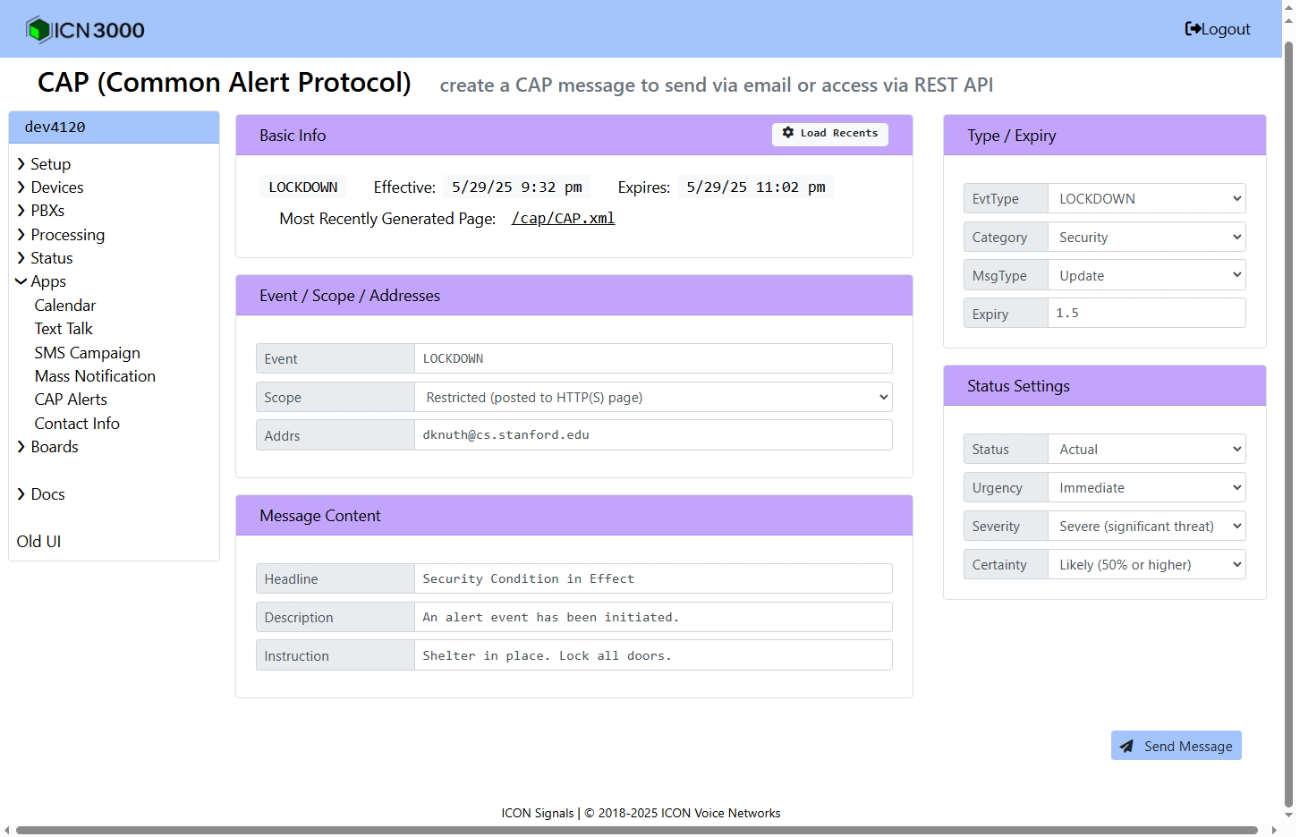
We will start with a CAP XML message generated by ICON Signals and discuss the various fields. The next two figures show the Signals UI screenshot and the resultant CAP XML.
<alert xmlns="urn:oasis:names:tc:emergency:cap:1.2">
  <identifier>a2fb4b3c-9ae0-4d9a-b03d-36aee3953010</identifier>
  <sender>alert@signals.com</sender>
  <sent>2025-05-30T02:32:03Z</sent>
  <status>Actual</status>
  <msgType>Update</msgType>
  <scope>Restricted</scope>
  <addresses>dknuth@cs.stanford.edu</addresses>
  <references>4ea0b438-815f-485b-9ea5-5a98df3c53bb</references>
  <info>
    <category>Security</category>
    <event>LOCKDOWN</event>
    <urgency>Immediate</urgency>
    <severity>Severe</severity>
    <certainty>Likely</certainty>
    <effective>2025-05-30T02:32:03Z</effective>
    <expires>2025-05-30T04:02:03Z</expires>
    <senderName>ICON Signals Test</senderName>
    <headline>Security Condition in Effect</headline>
    <description>An alert event has been initiated.</description>
    <instruction>Shelter in place. Lock all doors.</instruction>
    <area>
      <areaDesc>Site Descript</areaDesc>
      <polygon>45.0,-93.0 45.5,-93.5 46.0,-93.0 45.5,-92.5 45.0,-93.0</polygon>
    </area>
    <parameter>
      <valueName>evtType</valueName>
      <value>LOCKDOWN</value>
    </parameter>
    <parameter>
      <valueName>expiryHours</valueName>
      <value>1.5</value>
    </parameter>
  </info>
</alert>
<status>The Common Alerting Protocol (CAP) defines specific status values to indicate the handling state of an alert message.
| value | description |
|---|---|
Actual |
A real-life incident or event that is currently happening. |
Exercise |
A simulated or test alert used for training or drills. |
System |
A technical test message that does not require action. |
Test |
A message that is used to verify system functionality. |
Draft |
A preliminary alert that is not yet released to the public. |
These values help systems and users differentiate between real alerts, test messages, and system-generated notices.
<msgType>Supported message types are:
| value | description |
|---|---|
Alert |
The initial CAP message for an event. |
Update |
An update to the CAP alert, modifying the conditions or expiration. |
Cancel |
A CAP alert cancellation message. |
Note: The CAP specification also includes Ack (acknowledge) and Error message types. For simplicity, the Signals UI does not support these values. Alert, Update and Cancel should handle most use cases, require no explanation, and are unlikely to create confusion or indecision during emergency alert events.
<scope>The <scope> element defines who the alert is intended for.
| value | description | example |
|---|---|---|
Public |
The alert is intended for everyone. | A tornado warning affecting a populated area issued by the National Weather Service. |
Restricted |
The alert is intended for a limited audience. | A security situation at a school or business. |
Private |
The alert is intended for specific recipients only. | A health emergency requiring the aid of medical professionals. |
At this time, ICON Signals supports Restricted and Private scope messages.
For both private and restricted scope messages, Signals sends emails to all configured recipients.
For restricted scope, Signals also generates an XML file with the URI: /cap/CAP.xml. External CAP systems can be configured to process this page.
<category>The Common Alert Protocol (CAP) supports the following category values:
| value | description |
|---|---|
| Geo | Geophysical events (e.g., earthquakes, tsunamis, landslides) |
| Met | Meteorological events (e.g., hurricanes, tornadoes, blizzards) |
| Safety | General public safety threats (e.g., hazardous materials spills, explosions) |
| Security | Law enforcement, military, or homeland security alerts (e.g., active shooter, terrorist threats) |
| Rescue | Rescue and recovery operations (e.g., search and rescue missions) |
| Fire | Fire-related emergencies (e.g., wildfires, industrial fires) |
| Health | Public health alerts (e.g., pandemics, contamination warnings) |
| Env | Environmental concerns (e.g., pollution, industrial chemical releases) |
| Transport | Transportation disruptions (e.g., road closures, aviation incidents) |
| Infra | Infrastructure issues (e.g., power outages, telecommunication failures) |
| CBRNE | Chemical, Biological, Radiological, Nuclear, or Explosive threats |
| Other | Any other emergency category not covered above |
The ICON Signals UI limits categories to:
This is done in an effort to avoid presenting the user with a large number of choices in a crisis situation. We can easily add other CAP categories if needed for a customer application.
<event> and <headline>The <event> element is a required, officially standardized title for the CAP alert. For example:
<event>Severe Thunderstorm Warning</event>
The specific words are used by machines and systems to categorize the alert or hazard.
The <headline> element is an optional free-form field intended for human readers.
<urgency>In the Common Alerting Protocol (CAP), the Urgency field describes how quickly action must be taken.
| value | description |
|---|---|
Immediate |
Responsive action should be taken right now (e.g., tornado warning). |
Expected |
Action is needed soon (e.g., within the next few hours). |
Future |
Action is needed at some future time (e.g., a hurricane watch). |
Past |
The event has already occurred and is no longer an immediate concern. |
Unknown |
The urgency is not known. |
These values help emergency management systems and the public understand the required response speed.
<certainty>The Certainty field describes the likelihood of an event occurring. The supported values are shown below.
| value | description |
|---|---|
Observed |
The event has already happened or is currently occurring. |
Likely |
The event is likely (=50% probability) to happen. |
Possible |
The event may happen (<50% probability) but is uncertain. |
Unlikely |
The event is not expected to happen (used for informational purposes). |
Unknown |
The certainty is not known. |
<effective> and <expires>The CAP page in the Signals UI has an Expiry field in the upper right corner. That value (in hours) is used to set the effective and expires elements in the generated CAP message.
This section is TBD.
Code has been written to incorporate CAP alerts into Signals rules, but I am not sure if there is a use case for this feature. More work will be done if it turns out to be needed.
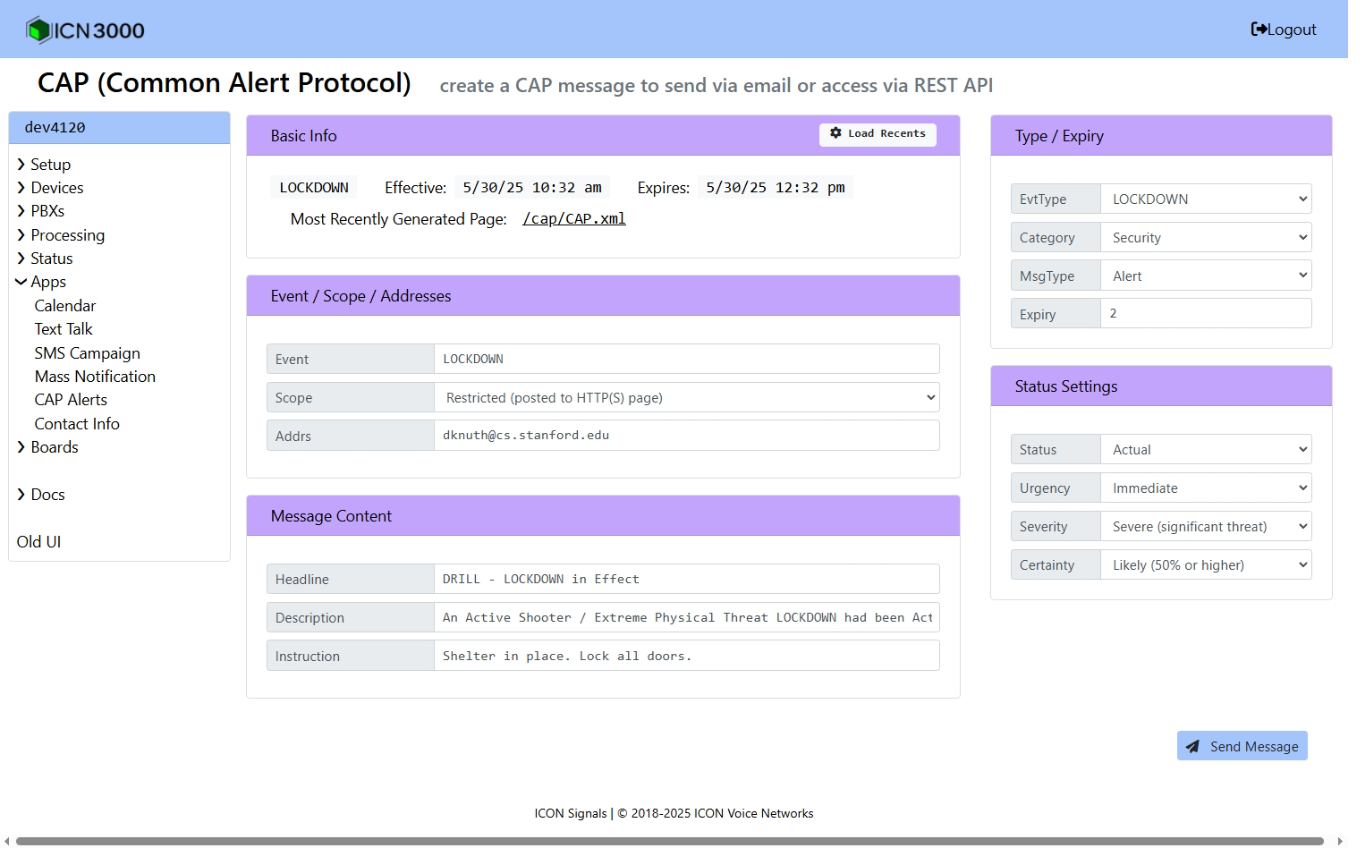
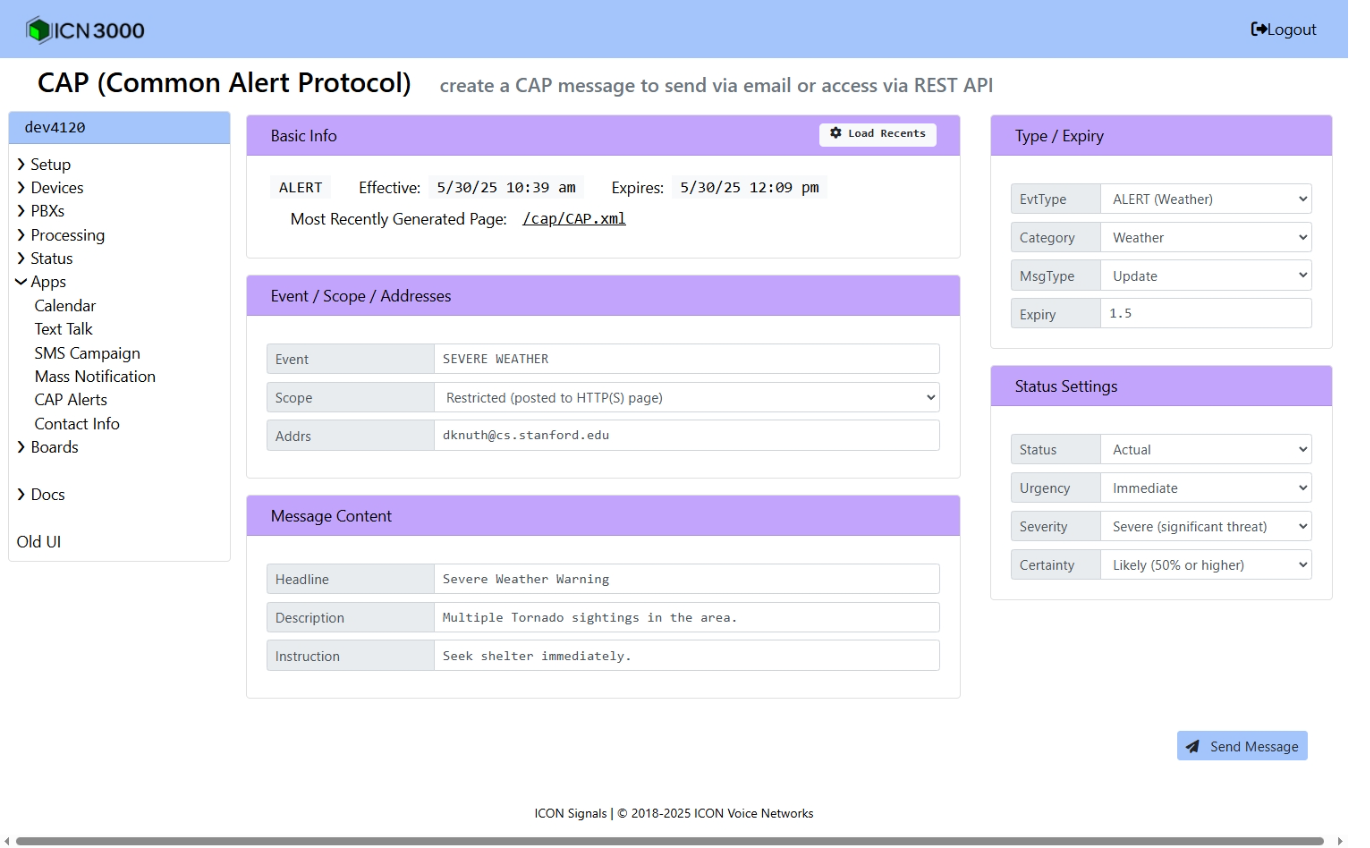
Here are some screenshots of possible CAP messages in the Signals UI. Note that previously-generated messages can be loaded and edited when generating a new CAP alert.
ICON Signals | 2018-2025 ICON Voice Networks