| date | desc |
|---|---|
| 18 Aug 2022 | initial |
This document describes a new family of devices in ICON Signals to hold state information for generalized event types such as LOCKDOWN, EVACUATE, E911, MEDICAL, etc.
We call these devices "virtual" because they don't directly represent physical hardware devices.
Enabling this device type interface allows us to:
display the devices in the sensor grid or a dashboard
easily view alarm history and event history
support escalations when the virtual device remains in alarm mode for an extended period of time
ICON Signals supports different types of sensor devices. When events are received from a device or device gateway, Signals creates or updates records in its database related to that device. Current status of devices in Signals is displayed in Workflow > Sensor Grid.
This works well for tracking alarm states of actual physical devices, but falls short for conditions such as a lockdown which can be initiated or cleared by various means.
If we create a "LOCKDOWN" device within ICON Signals and set or clear it's alarm state, we can more easily avoid double-reporting of alert conditions. (There are some important TBD details involving rule preconditions, but it's a good start.)
A "LOCKDOWN" device can also be shown on a dashboard screen and display recent alarm and event history.
Where virtual devices are really useful is when multiple generalized alerts are needed at a site. Examples would be separate LOCKDOWN alerts for different schools in a district, or multiple types of MEDICAL alerts for a health care facility.
Virtual Devices are single-I/O-channel bi-stable devices. They are either in "alarm mode" or "clear mode" (non-alarm).
Like other device types, virtual devices are created dynamically within ICON Signals when relevant event data is received and the device doesn't already exist in the Signals database.
Device IDs for virtual devices are 12 characters in length, starting with 'V', followed by a 3-digit type code and an 8-digit serial number.
  format:  V{3-digit-type}{8-digit-serial}

  examples:

  V00800000001  - LOCKDOWN Virtual
  V01100000005  - SHELTER Virtual
  V12900000001  - PBX.1 Virtual
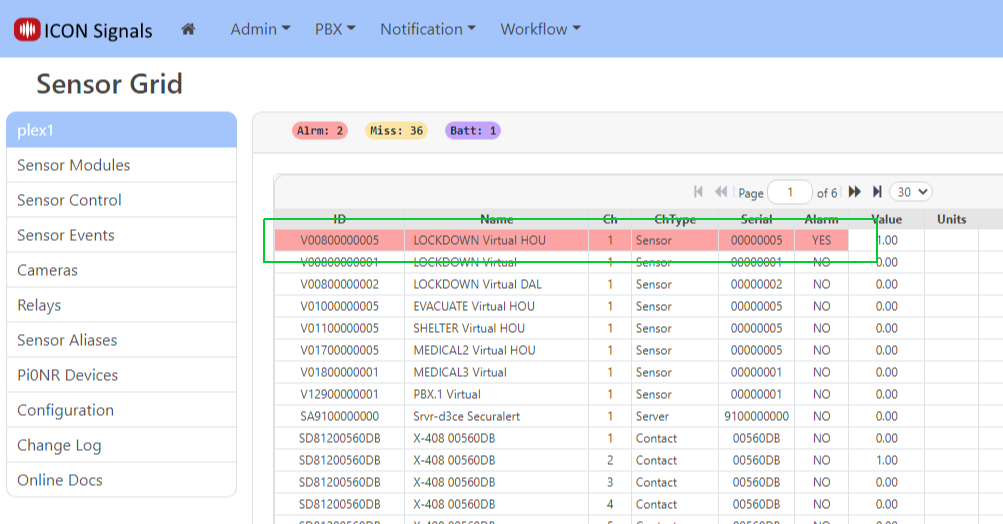
  V00800000005  - LOCKDOWN Virtual HOU (location-specific)
Virtual Device type codes can be found on the Generalized Events page.
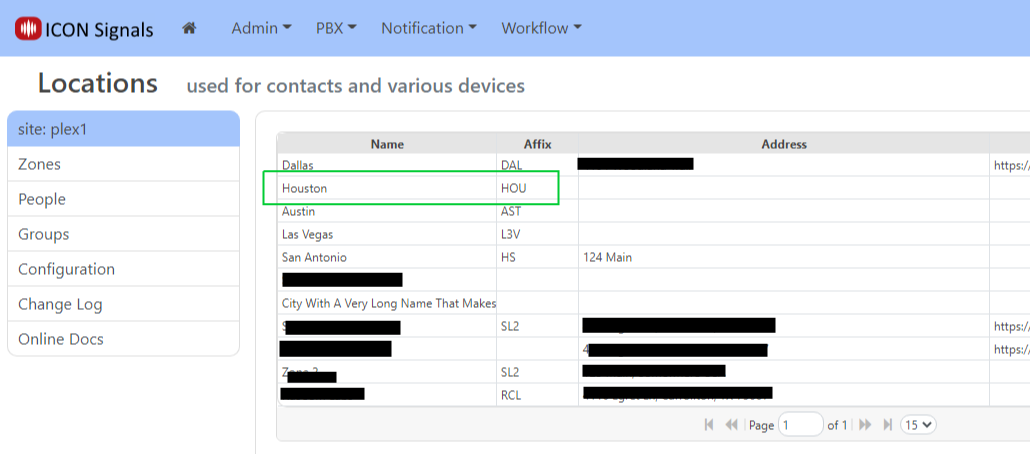
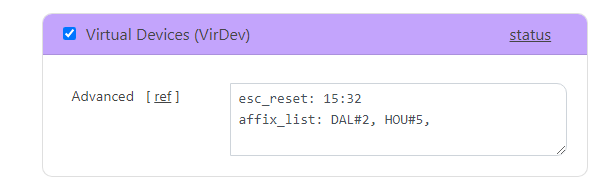
The default serial number is 1 (left-padded with zeros). Other serial numbers can be assigned for location affixes.
In the example above serial number 5 is assigned to the affix for a Houston office (HOU). A lockdown initiated from that location will be associated with device V00800000005 instead of the default lockdown device.
Unlike other device types, virtual devices do not raise signals themselves. They are holders of alarm state for specific conditions.
Currently, virtual devices can be updated by:
Incoming external events (source-dependant)
PBX Connection (unexpected disconnects and re-connects only)
Rule Action Scripts, e.g. added to LOCKDOWN rules executed by contact closure or a ringing virtual extension
Using the External Events API we will generate LOCKDOWN and CLEAR events. This is currently only implemented for the ICON Mobile External Event source (ICON).
curl -X POST --user 'apikey:ICON.3BA90E1C' \
  --insecure \
  http://localhost:6500/sr/api/evt/data \
  -H "Content-Type: application/json" \
  -H "Expect:" \
  -d '{ "sigSrc": "ICON",
        "inhouse-signals.ApiKey":"ICON.7813FFFF",
        "sigType":"LOCKDOWN",
        "sigMode":"ACTUAL",
        "sigMsg": "Some message text for the lockdown",
        "sigID": "affix",
        "contactNbr":"",
        "contactEmail":"",
        "contactExt":"2813",
        "sender": {
          "employeeID": "111222",
          "name": "Jane Smith",
          "number": "+19727420671",
          "ext": "2813",
          "email": "jsmith@mayberry-elem.edu"
        },
        "addr": {
          "street1": "123 Main",
          "street2": "",
          "city": "Mayberry",
          "state": "NC",
          "zip": "12345"
        }
      }'
We have a contact record for the sender in the Signals database and her location is the Houston office (affix HOU). Signals updates the LOCKDOWN virtual device associated with that affix.
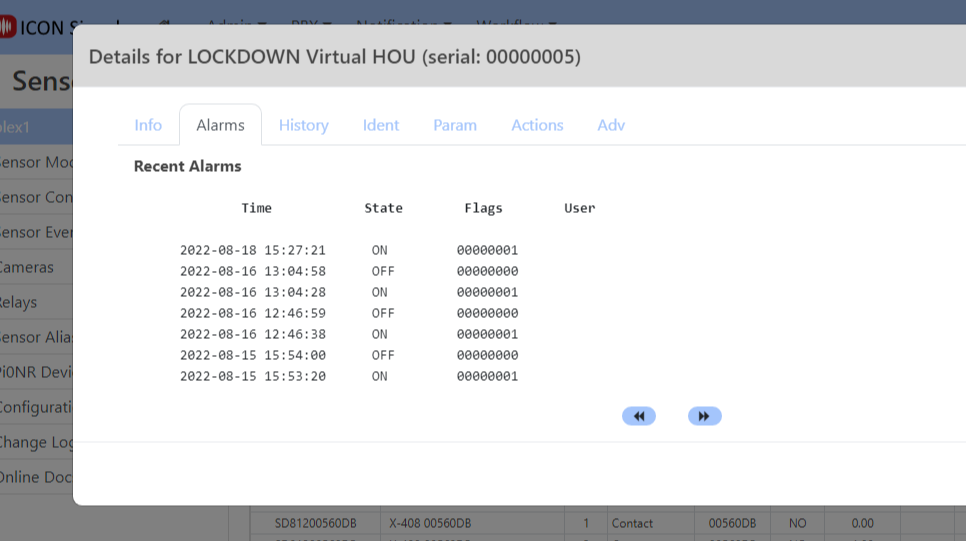
If another LOCKDOWN is initiated by a user in the same location before this one is cleared, Signals returns an error message to the caller and does not trigger a second lockdown procedure.
{
  "Code":409,
  "Desc":"--- Raising ON Signal disabled for V-LOCKDOWN-5, already in Alarm mode"}
Now we will clear the LOCKDOWN.
curl -X POST --user 'apikey:ICON.3BA90E1C' \
  --insecure \
  http://localhost:6500/sr/api/evt/data \
  -H "Content-Type: application/json" \
  -H "Expect:" \
  -d '{ "sigSrc": "ICON",
        "inhouse-signals.ApiKey":"ICON.7813FFFF",
        "sigType":"CLEAR",
        "sigMode":"ACTUAL",
        "sigMsg": "Some message text for the lockdown",
        "sigID": "affix",
        "contactNbr":"",
        "contactEmail":"",
        "contactExt":"2813",
        "sender": {
          "employeeID": "111222",
          "name": "Jane Smith",
          "number": "+19727420671",
          "ext": "2813",
          "email": "jsmith@mayberry-elem.edu"
        },
        "addr": {
          "street1": "123 Main",
          "street2": "",
          "city": "Mayberry",
          "state": "NC",
          "zip": "12345"
        }
      }'
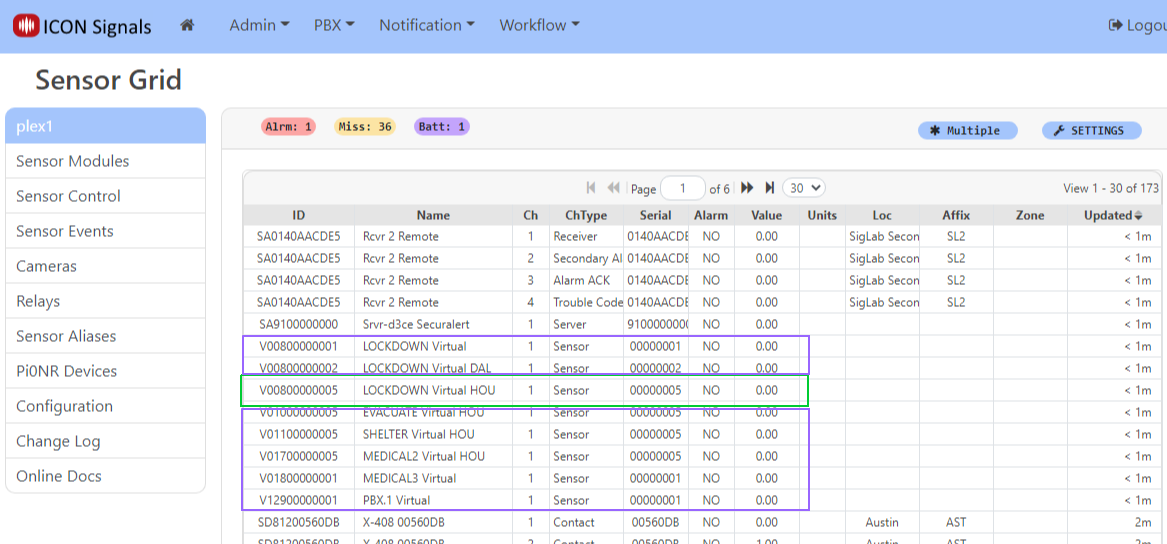
Notice that all of the virtual devices for this Signals site were updated with an alarm OFF (clear) condition. This is because we sent a request message with sigType of CLEAR, which equates to an "ALL CLEAR".
Signals has the ability to clear all virtual device alarms or just alarms for specific categories. In this case, we could have used CLEAR_SRP which would have cleared a LOCKDOWN, LOCKOUT, SHELTER, EVACUATE or E911 alarm but not a MEDICAL, PBX or other alarm.
More details can be found in the Generalized Events and External Events API pages.
Currently, virtual devices in alarm mode can be confirmed in the Signals UI and that will raise an OFF signal. That behaviour may change going forward.
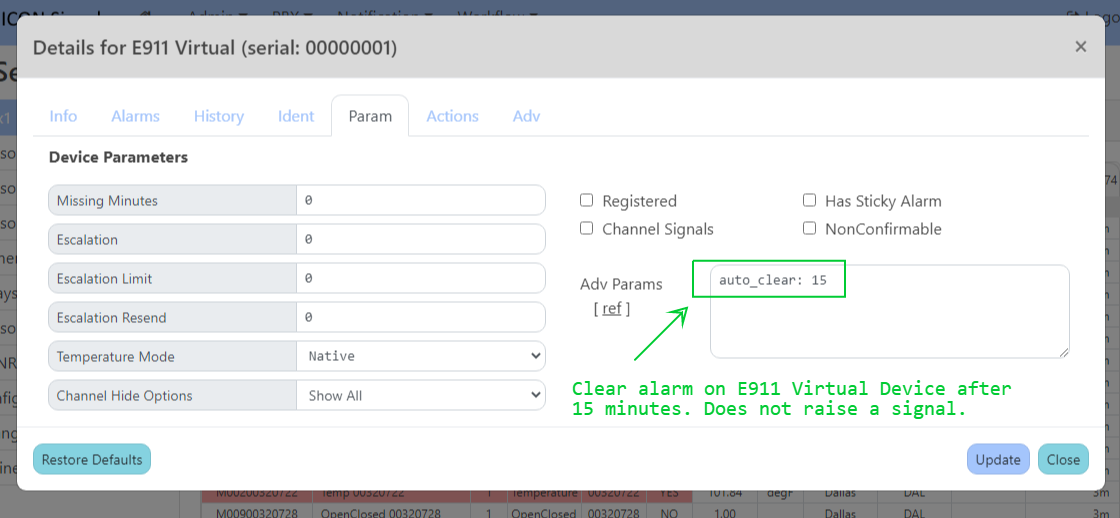
There is also an auto_clear parameter which will clear the device without raising a signal after a specified number of minutes in alarm mode. This is useful for something like an E911 virtual where there isn't a procedure to clear the condition.
2018-2022 ICON Voice Networks